> This is part 1 of 4 of the full documentation (pages 1–100 of 345).
> The content is paginated: fetch every part to see all of it.
> Next part: https://docs.navigaglobal.com/dashboard-writer/llms-full.txt/1
> Page index: https://docs.navigaglobal.com/dashboard-writer/llms.txt
# About
Dashboard - Writer
{% hint style="info" %}
The Writer plugin in the Dashboard is a bridge between the Dashboard and the Writer. For more in depth information and want to know more about the Writer go to:
{% endhint %}
### Description
Embed the Naviga Writer directly into your Dashboard.
# Changelog
{% hint style="success" %}
## 5.1.9 (2026-10-01)
### Added
* Accessibility: WCAG 2.2 AA conformance
* Fix Google Fonts GDPR compliance issue
* Support of Delete Photos
{% endhint %}
{% hint style="info" %}
## 5.1.8 (2026-05-19)
### Fixed
* [Unique User Count Discrepancy in Writer Billing Reports](/dashboard-writer/5.1.9/developer/how-unique-writer-users-counted-in-billing-report)
{% endhint %}
{% hint style="info" %}
## 5.1.7 (2025-12-15)
### Added
* [Logs API integration](/dashboard-writer/5.1.9/admin/config/logs-api)
### Fixed
* [Writer plugins not loaded with local network due to stricter security policies in latest Chrome and Edge (v142.x and Above)](/dashboard-writer/5.1.9/developer/browser-policies-chrome-v142.x-and-above)
{% endhint %}
{% hint style="info" %}
## 5.1.6 (2025-06-13)
### Added
* Support for Image Suggest Search feature in Writer Plugin im-navigaphotos 1.2.0
### Fixed
* Vulnerability fixes for SOC compliance
{% endhint %}
{% hint style="info" %}
## 5.1.5 (2025-03-12)
### Added
* Support for OC List Clear Jump data for drag and drop the article
* Support for Clear the Jump data for coping the article in dashboard plugin
* Esc key support to close writer when in modal view
* Numpad shortcut support for Writer
{% endhint %}
{% hint style="info" %}
## 5.1.4 (2024-09-05)
### Added
* Registered action and event for image search modal
### Fixed
* Duplicating copy of article fails because of assignment link with no uuid / incorrect assignment link in article xml
* PageHub - hide open in writer optional and close article preview modal on esc key
{% endhint %}
{% hint style="info" %}
## 5.1.3 (2024-03-27)
### Fixed
* Include author data in article xml when article created from assignment and article author differ from assignee
* Support for Danish Translation
{% endhint %}
{% hint style="info" %}
## 5.1.2 (2023-12-19)
### Fixed
* Browser tab title gets updated with Article headline instead of Dashboard in NRP standalone mode
* Dashboard throws an error and the copy fails when an article with related geodata is copied via Article Search or Pub Planner
{% endhint %}
{% hint style="info" %}
## 5.1.1 (2023-03-28)
### **Added**
* UK/US Date Localization
### Fixed
* Articles do not load when opened directly in external tab
* Copy and edit from Article Search or Publication Planner opens empty article
* Image gallery drag and drop blank caption issue
* Copy of an article in article search, the link to the assignment should be removed
* Can save event, plan and assignment without a title
* Can not add a title if the story in Wire has no Headline
* Use article names on tabs when in "stand alone" mode
* Articles do not load when opened directly in external tab with a user that has more than one author mapped
{% endhint %}
{% hint style="info" %}
## 5.1.0 (2022-09-12)
### Added
* Unit-scoped Access Token support
{% endhint %}
{% hint style="info" %}
## 5.0.1 (2022-04-12)
### Fixed
* Issue with user selection in article preview
{% endhint %}
{% hint style="info" %}
## 4.2.1 (2022-04-12)
Fixed
* Issue with user selection in article preview (back ported)
{% endhint %}
{% hint style="info" %}
## 4.2.0 (2022-03-22)
### Added
* Ability to store author data on author links when copying articles ([requires configuration](/dashboard-writer/5.1.9/admin/config/copy-articles#store-author-data))
* Support for XML when copying and handling articles
* Support for exporting loadable components config
* Article size and scheduled publication as loadable components
### Fixed
* Issue with remove itemMetaExtProperty in Advanced copy article
{% endhint %}
{% hint style="info" %}
## 4.1.0 (2021-06-07)
### Changed
* Tabs style
### Fixed
* Characters count in Preview with "inline notes"
### Updated
* dependencies
{% endhint %}
{% hint style="info" %}
## 4.0.0 (2021-04-27)
### Added
* Ability to configure if Concept relations should be stored
* Action to open Article preview in a modal
* Action to get Writer Instance
### Changed
* New improved communication setup to better handle internal redirects/reloads in the Writer
### Fixed
* Better performance when running multiple tabs at once
### Removed
* Create new article Widget in the top menu bar has been removed *(should utilise* [*Action Widget*](https://docs.navigaglobal.com/dashboard-action-widget/) *to create article instead)*
{% endhint %}
{% hint style="info" %}
## 3.0.0 / 2.2.0 (2021-03-26)
### **Added**
* Article copy modal/portal/functionality.
* Article preview portal component.
* Article model.
### **Fixed**
* Confirm on going back on browser history if an Article has un-saved changes within a Modal.
### **Removed**
* Notifications requirements from Plugin Mappings.
{% endhint %}
{% hint style="info" %}
## 2.1.0 (2020-09-23)
**Fixed**
* Issue where Writer plugin get stuck in an "un-saved" state when duplicating an article from the Writer.
* Creating new articles from Widget doesn't work when saving a draft article.
**Added**
* An action to create new articles to be triggered from Action Widget
{% endhint %}
{% hint style="info" %}
## 2.0.0 (2020-08-24)
The major version has nothing to do with config changes but rather utilising the new Dashboard 4.0 plugin API. *(Can only be run on Dashboards version 4.0 and higher)*
**Fixed**
* Issue with opening articles in external window from modal when a new article being saved.
* Confirm before close if the Article has unsaved changes when editing inside a modal.
**Changed**
* Plugin-API to utilise the new API from DB v4.
{% endhint %}
{% hint style="info" %}
## 1.4.0 (2020-02-19)
### Added
* Default configuration with DB key store value
{% endhint %}
{% hint style="info" %}
## 1.3.4 (2019-11-28)
### Fixed
* functionality to stop the user from closing the writer if there is changes to the article while the writer is opened in a modal
{% endhint %}
{% hint style="info" %}
## 1.3.3 (2019-10-02)
### Fixed
* issue with writer close confirmation not working consistently in some browsers
{% endhint %}
{% hint style="info" %}
## 1.3.2 (2019-10-01)
### Fixed
* issue with not all content displaying while running writer with tabs
{% endhint %}
{% hint style="info" %}
## 1.3.1 (2019-09-17)
### Fixed
* issue when changing dashboard language to a not supported one by the plugin
{% endhint %}
{% hint style="info" %}
## **1.3.0 (2019-08-06)**
### Fixed
* Opening articles from other plugins without having the Tabs active.
{% endhint %}
{% hint style="info" %}
## **1.2.0 (2019-08-06)**
### Added
* Hashtag before article uuid when trying to open any article.
{% endhint %}
{% hint style="info" %}
## **1.1.0 (2019-08-05)**
### Added
* Names for required actions for plugin Mappings.
{% endhint %}
{% hint style="info" %}
## **1.0.0 (2019-07-31)**
### Changed
* Removed all events listeners and replaced with Dashboard actions.
### Added
* Config to display either Article's `headline` or Article's `name` as the tab title if Tabs are active.
### Fixed
* Displaying the full tab title if it's possible.
{% endhint %}
###
# How to
# Chrome v142.x & above
User inputs while logging in from Chrome browser v142.x and above which contain local area network security fixes.
With the upgrade to version 5.1.7 the user will see a pop-up when loging in first time to writer applications that are called internally by dashboard, such as NP Job plugin.\
\
The user will need to select allow in that case when prompted.
Note: There is no need to set **chrome://flags#local-network-access-check : Disabled** when upgraded.
# Config
### **Configured with a Writer endpoint**
* in your Dashboard go to > plugins > Writer > settings.
* and add Writer endpoint url, `example: https://writer.demo.imit.infomaker.io`
* and then click save.

### **Mappings**
Writer plugin require mappings for:
* **Image Content Provider:** in order to handle images for article preview
* **Content Agent:** in order to fetch/write with CCA
* **Status Map**: in order to set statuses on copied articles
In your Dashboard go to `plugins > Writer > settings > mappings`
### **Activate Writer-Tabs**
* in your Dashboard after you have installed Writer Plugin go to > `Dashboard menu > Application settings`
* in Writer Plugin settings, click on writer tabs switch button.
* and then click save, to save the changes.

### **Choose Tab title value**
Now you can choose between Article's headline and Article's name to be as a Tab title when you have your Tabs active
* in your Dashboard after you have installed Writer Plugin go to > Store > Writer plugin.
* Click on settings button.
* You will See at the bottom of the Settings section two options that you can select from
* Select your option and click on save

### Update Dashboard plugin in Writer
To test the new Dashboard integration plugin in your Writer:
* Go to your Writer endpoint.
* Go to your settings by pressing `CMD + shift + Y` in Mac or `Ctrl + shift + Y` in Windows.
* Find and remove the old plugin with name: `dashboardintegration`.
* Add a new plugin with the following settings:
* Id: `io.infomaker.dashboard`
* Name: `dw-plugin-dashboard`
* Plugin src url:
* `https://plugins.writer.infomaker.io/v1/infomaker/dw-plugin-dashboard/{PLUGIN_VERSION}/index.js`
* Plugin css url: `https://plugins.writer.infomaker.io/v1/infomaker/dw-plugin-dashboard/{PLUGIN_VERSION}/style.css`
* Then enable the new plugin by activate the enable switch button.
> [See Dashboard plugin configuration](https://plugins.writer.infomaker.io/v1/infomaker/im-dashboard-integration/latest/README.html)
> [See Dashboard plugin versions](https://plugins.writer.infomaker.io/v1/infomaker/im-dashboard-integration/latest/VERSIONS.html)
# Store author data
From Writer 4.2.0 we added the ability to store author data on the data node of the author link. In order to do this following step needs to be made.
* Add `WRITER_CONCEPTS_TEMPLATE_URL` to config key store with following value depending on environment:
* Stage:
* Prod:
After this is done all article creation that's being handled by this plugin will append concept data onto the author link in the document.
# Writer 7 and later
This page explains what configuration is needed for the Writer Dashboard plugin to work with Writer 7 and later
If you are running Writer 7, you will need to make some additional settings in Writer settings.
### Key Store values to be added (if not already added)
Before doing this, you will also need to add new "Key Store" values:
| Key name | Key Value |
| --------------------- | -------------------------------------------------------------------------------------------------------------------------- |
| WRITER\_RESOLVER\_URL | \* |
| WRITER\_ROUTER\_URL | [https://writer-router-eu-west-1.saas-prod.infomaker.io](<
https://writer-router-eu-west-1.saas-prod.infomaker.io>) \* |
\*) Depending on environment typ (production, stage) change `prod` to `stage` if necessary. \
\*\*) The URL is dependent on Naviga deployments per region and the actual link will differ.
### Writer configuration / settings
Flip the switches for "Use SaaS Endpoints …" as well as "Use proxy for Writer requests". Fill in the key values as stated below.
```
You will need the folllowing "keys":
Writer Resolver URL
${DBKS:WRITER_RESOLVER_URL}
Writer Router UR
${DBKS:WRITER_ROUTER_URL}
```

# Writer 8 and later
Here you control on how handling integration between Writer and Dashboard
### Configuration tab
ICP Writer provider, the name of the provider that Writer will utilise for rendering images.\
Default value is: **writer**\
If [Image Content Provider (ICP) 1.3.0](https://docs.navigaglobal.com/image-content-provider/) or later is installed this provider should be installed and ready to use with default value, otherwise the provider named above must be [configured](https://docs.navigaglobal.com/image-content-provider/config/default-config) in ICP.
### Integration tab
Decide on how images should be handled when used in Writer.\
Default value is: **Always show upload dialog**
### **Mappings**
Photos metadata preview\
Photos metadata validation\
Photos metadata edit\
Photos download image\
Photos upload image
These mappings are all marked as optional but are **required** if you are using Writer 8 since Writer 8 is using Naviga Photos to handle binary files such as images.\
And if these are to be used, [Naviga Photos 3](https://docs.navigaglobal.com/naviga-photos/3.0.0-4/) or later is required.
\
# Structure
Here you decide what fields to use when creating, copying or changing an article.
In some places the user can choose to create or copy an article. A modal is opened. Here is the place where you set which fields the user will see in those modals, regarding the article, and be able to fill these with data.
1. Drag the fields that you want to use from right to left into the box.
2. And then you can change the order of the fields by holding down the mouse button on the three lines to the left.
3. Some fields are configurable, if they are, they have a cog icon to the right if they are in the left box. By clicking the cog icon, you can change the configuration for that field.
4. You can remove a field by clicking on the remove icon.

# Article size
If you want to be able to set which size an article should have you need to configure this both in Dashboards Writer plugin and [in the configuration for the Writer](https://plugins.writer.infomaker.io/v1/infomaker/im-articlesize/latest/README.html).
You do this configuration under structure, you choose if you want to use it and which size is the default size.
# Copy articles
To enable the Copy Article feature in various plugins, the Writer plugin is needed, and configuration needs to be handled in advance.
{% hint style="info" %}
## Article Copy info
We now support XML handling with Article copy therefore we added a setting for changing the default storage provider.\
\
If default storage provider is set to CCA, you must be sure that content is CCA "compliant". This means, that before a you can activate and use the copy functionality, we need to verify your content with the Naviga backend team to make sure the article content is fully compliant with the CCA API and our new Naviga Doc format. In most cases, this is a straight forward process with no needed changes by you as a customer. In other cases this will require configuration by the backend team. We also know of some cases where there will be requirements to change how content is written, and for old content to be patched.
{% endhint %}
### **Mappings needed in Writer plugin**

### **Needed changes in Content Agent**
Unless you have already configured Content Agent for CCA, you will need to make changes in the Content Agent plugin. Here is an example of such configuration:
```javascript
{
"ca-provider": {
"default": true,
"cca": {
"baseUrl": "${DBKS:CCA_URL}"
},
"opencontent": {
"host": "${DBKS:CA_OC_PROVIDER_URL}"
},
[...]
}
}
```
```javascript
baseURL
${DBKS:CCA_URL}
KeyStore name: CCA_URL
Key Value: https://cca-eu-west-1.saas-stage.infomaker.io/
```
### **Cleanup/remove**
It is possible to clean up the article when the copy is made, here is an example of such a cleanup. We'll be adding more examples and possibilities / restrictions:
```javascript
{
"remove": [
{
"element": "meta",
"data": [
"provider"
]
},
{
"element": "link",
"data": {
"rel": "mainchannel",
"type": "x-im/channel"
}
},
{
"element": "link",
"data": {
"rel": "channel",
"type": "x-im/channel"
}
},
{
"element": "link",
"data": {
"rel": "subject",
"type": "x-im/section"
}
},
{
"element": "itemMetaExtProperty",
"data": {
"type": "imext:header"
}
}
]
}
```
{% hint style="danger" %}
### News value related issue in the Writer
Currently there is an issue in the Writer, that requires a news value, and if it is not present the Writer will add it. This means, that if you remove it with code, the Writer will add it and the user will be prompted to save even if the user didn't make any changes. This is an issue we will be addressing, but for the time being we recommend not to remove the News Value.
{% endhint %}
```javascript
{
"element": "object",
"data": {
"type": "x-im/newsvalue"
}
}
```
### Plugin mappings
In each plugin that supports copying, you will also need to add the mapping for this feature

## Concept relations
When copying articles you're able to add additional concepts to the copy. With this new feature we also added functionality to allow for relations to be stored in the document. In order to allow this feature you need to turn it ON under "Copy Article" customisations.


### Store author data
New in Writer 4.2.0 we added the ability to store author data on the data node of the author link. In order to do this following step needs to be made.
* Add `WRITER_CONCEPTS_TEMPLATE_URL` to config key store with following value depending on environment:
* Stage:
* Prod:
# Logs API
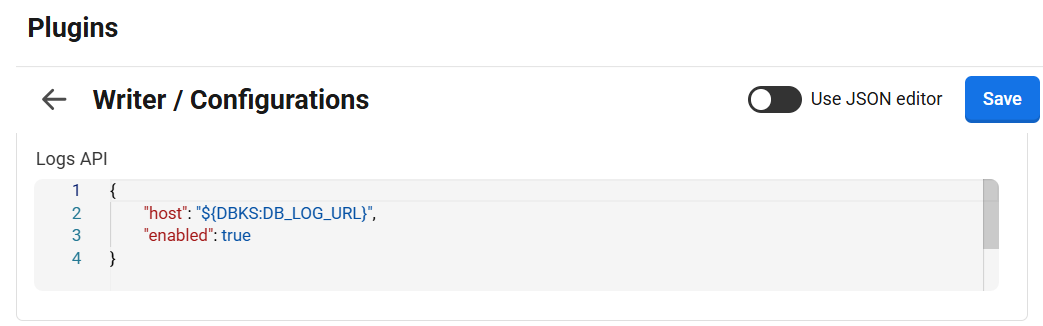
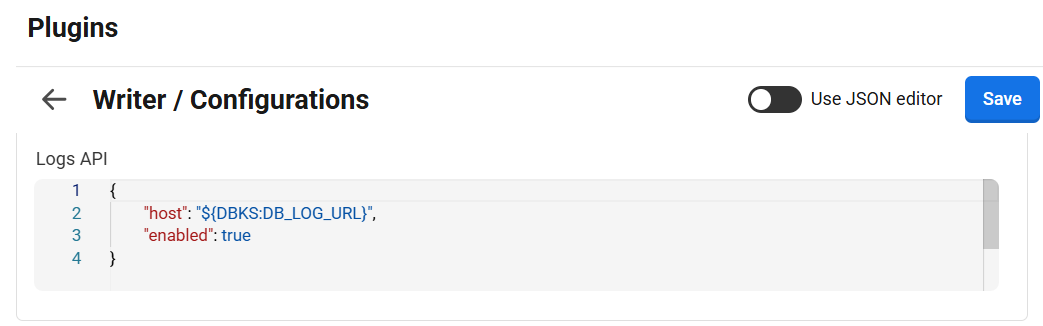
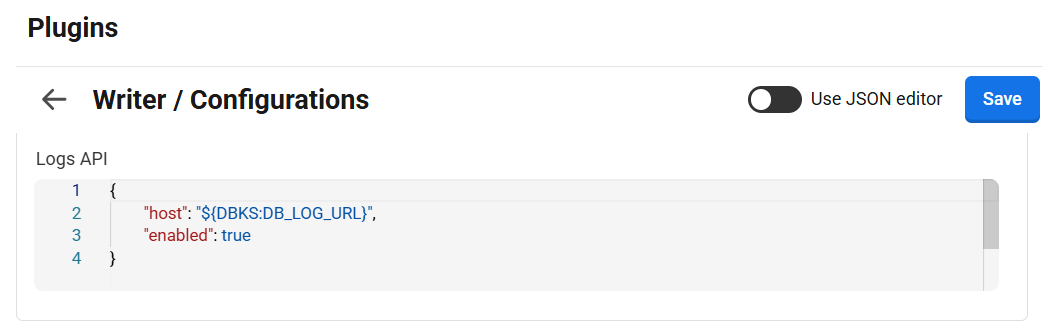
Integrated the Logs API to capture and send errors to AWS CloudWatch whenever an API failure occurs or any code inside a try-catch block throws an error
This logging mechanism is **configurable** via the `enabled` flag (`true` or `false`) under the `logsApi` configuration.\
There is **no functional impact** from this change — it only adds optional error logging to AWS for better monitoring and debugging.
Sample configuration:
```
{
"host": "${DBKS:DB_LOG_URL}",
"enabled": true
}
```
**Configuration Details:**
`host` This field specifies the host url for the logs. host url will be available in dashboard config key store with key **DB\_LOG\_URL**
`enable` This field can be set either *True* or *False.* If set to true then it will capture and send errors to AWS CloudWatch for better monitoring and debugging. If set to false then errors would not be logged on AWS.
LogsAPI URL:\
1\. Stage - \
2\. Prod. - [https://db-plugin-logs-api-eu-west-1.saas-prod.infomaker.io/](https://db-plugin-logs-api-eu-west-1.saas-stage.infomaker.io/)
# Requirements
{% hint style="info" %}
## Article Copy info
We now support XML handling with Article copy therefore we added a setting for changing the default storage provider.\
\
If default storage provider is set to CCA, you must be sure that content is CCA "compliant". This means, that before a you can activate and use the copy functionality, we need to verify your content with the Naviga backend team to make sure the article content is fully compliant with the CCA API and our new Naviga Doc format. In most cases, this is a straight forward process with no needed changes by you as a customer. In other cases this will require configuration by the backend team. We also know of some cases where there will be requirements to change how content is written, and for old content to be patched.
{% endhint %}
## Actions
{% hint style="info" %}
### [Image Content Provider](https://docs.navigaglobal.com/image-content-provider/) *`>=`1.2.0*
*if used towards Writer 8 - version >=`1.3.0` is preferred.*
{% endhint %}
{% hint style="info" %}
### [Content Agent](https://docs.infomaker.io/content-agent/) *`>= 2.0.0`*
{% endhint %}
{% hint style="info" %}
### [Status Map](https://docs.infomaker.io/dashboard-status-map/) *`>= 2.0.0`*
{% endhint %}
# Migration
When upgrading the Writer plugin, you must make minor changes to mappings
##
# v3 => v4
## Integration
{% hint style="warning" %}
Dashboard Integration plugin in the Writer needs to be upgraded to at least version 3.0.0
{% endhint %}
## ICP
Since the addition of functionality to be able to preview articles through the writer plugin it now also requires a mapping towards ICP. The required mapping is the following:

## Widget
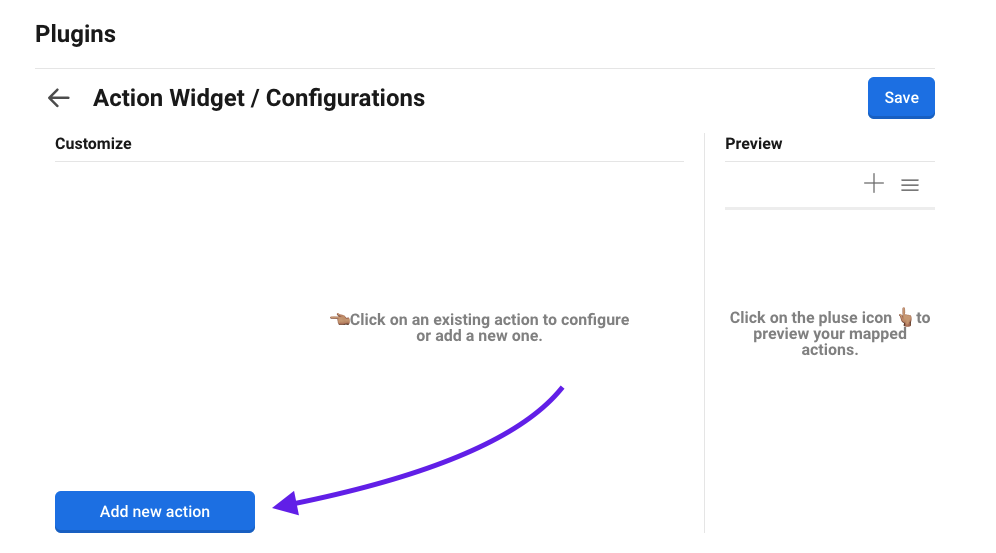
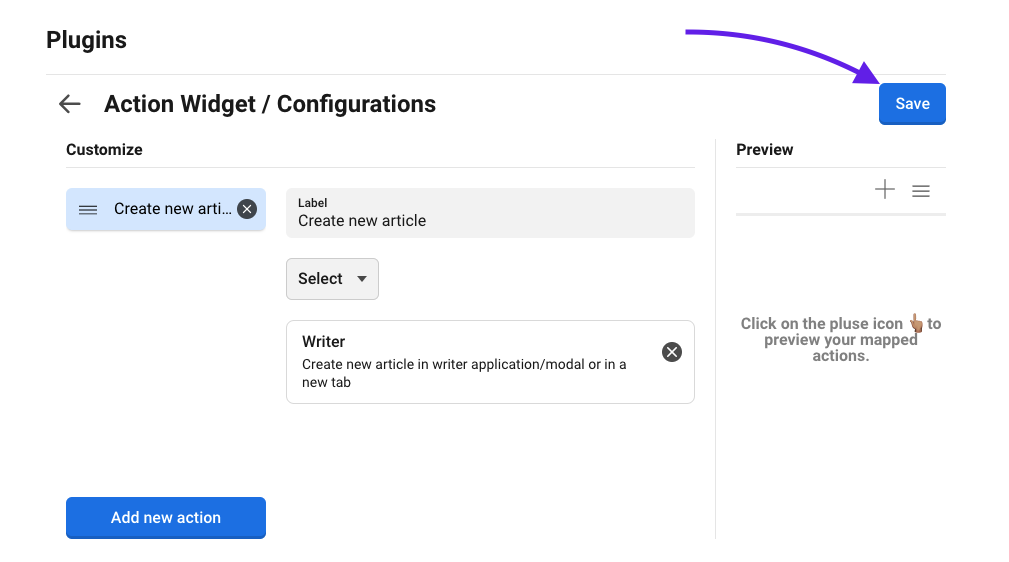
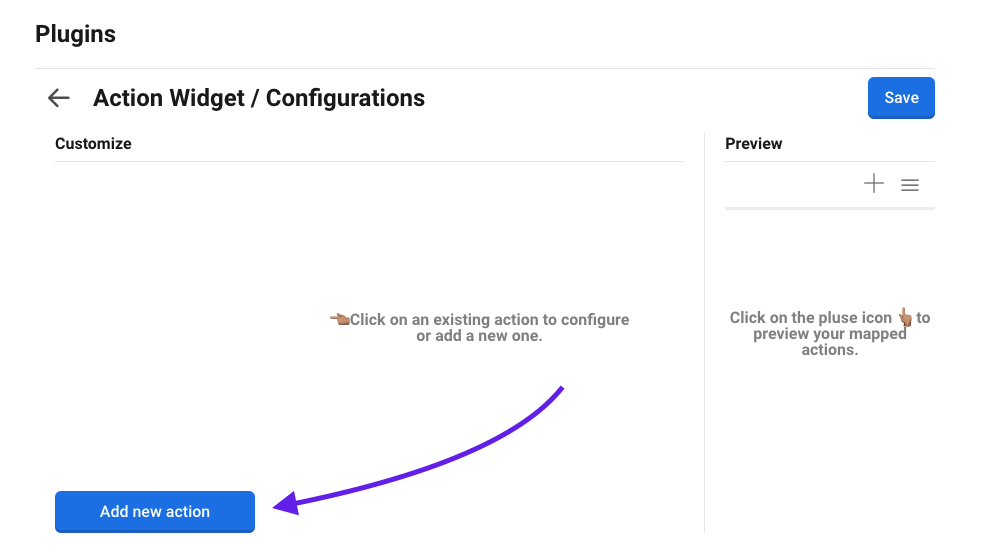
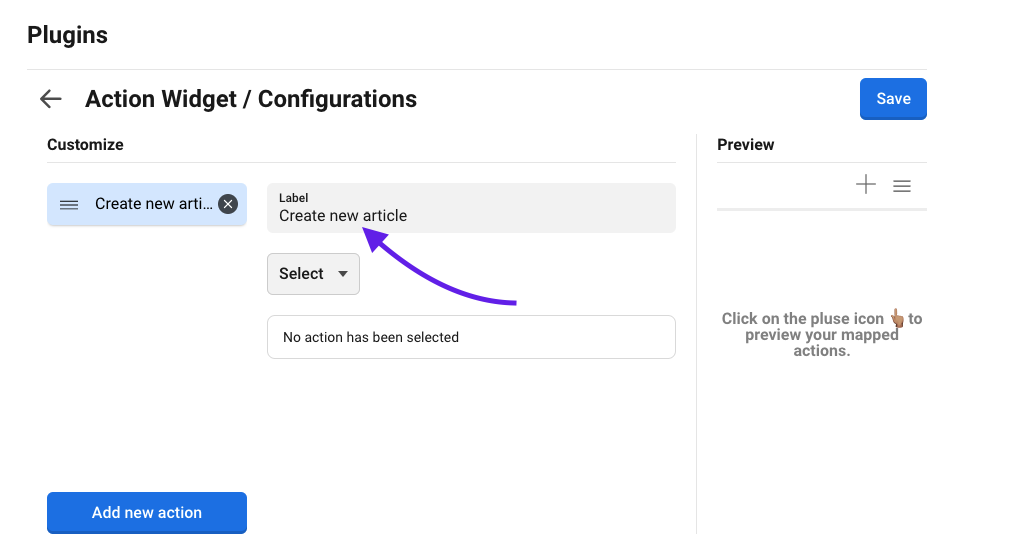
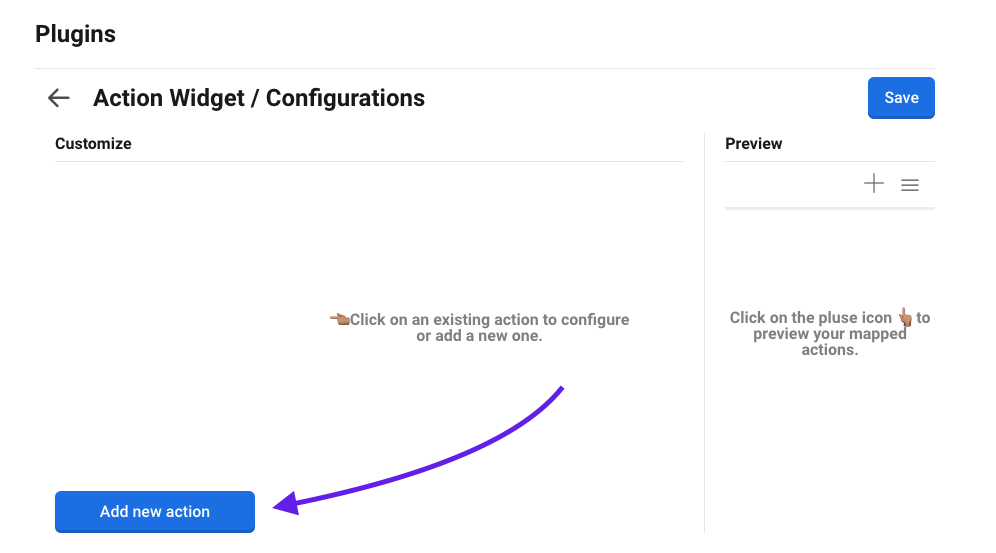
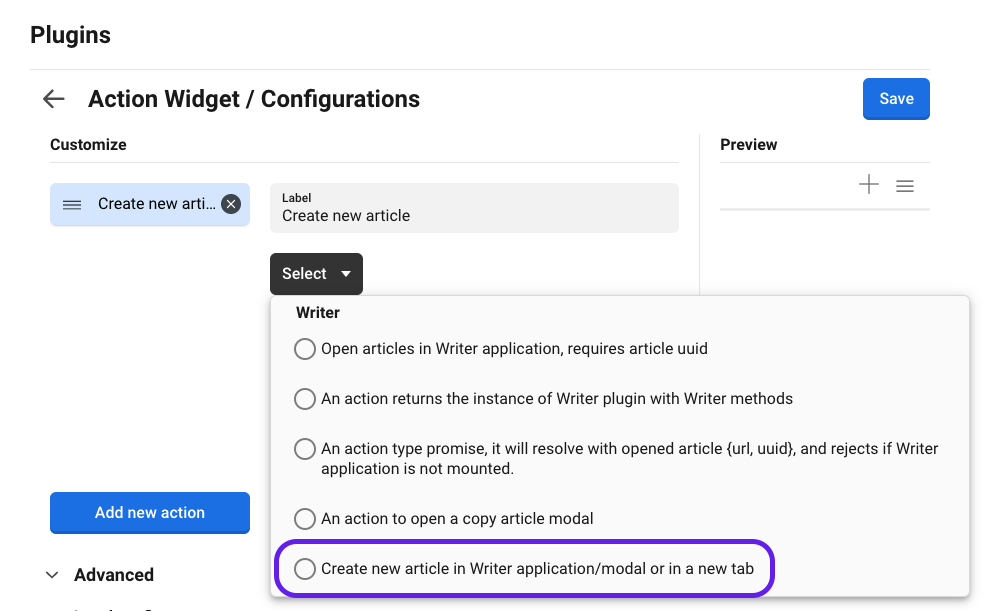
In version 4.0 we decided to remove the internal Widget housing the functionality to create an article (the airplane icon in the top menu). This due to the more generic `Action Widget` plugin solving the same problem. To yet again allow for creation of articles from the Widget bar you should follow these simple steps.
First install `Action Widget` plugin if you don't already have it installed. This could be found under the **Available Plugins** tab.
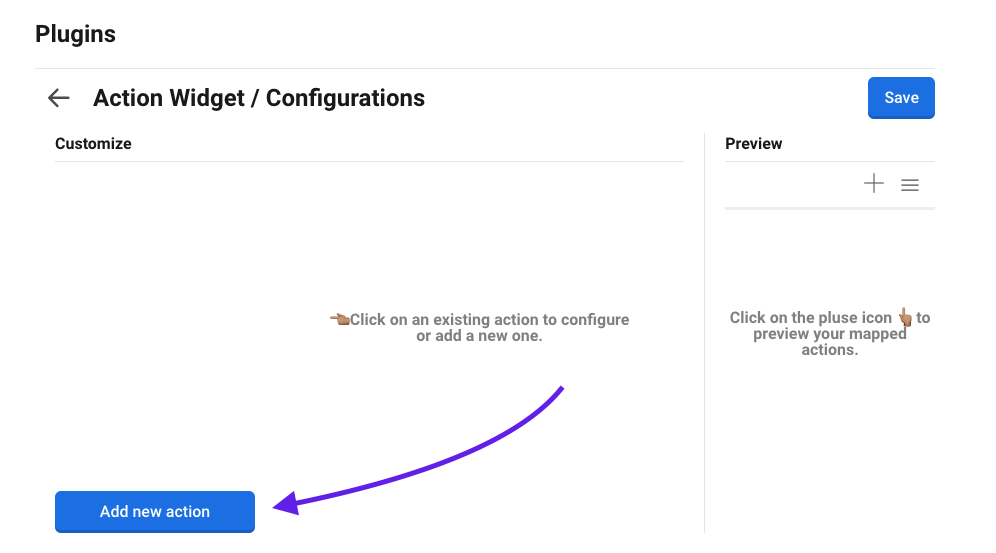
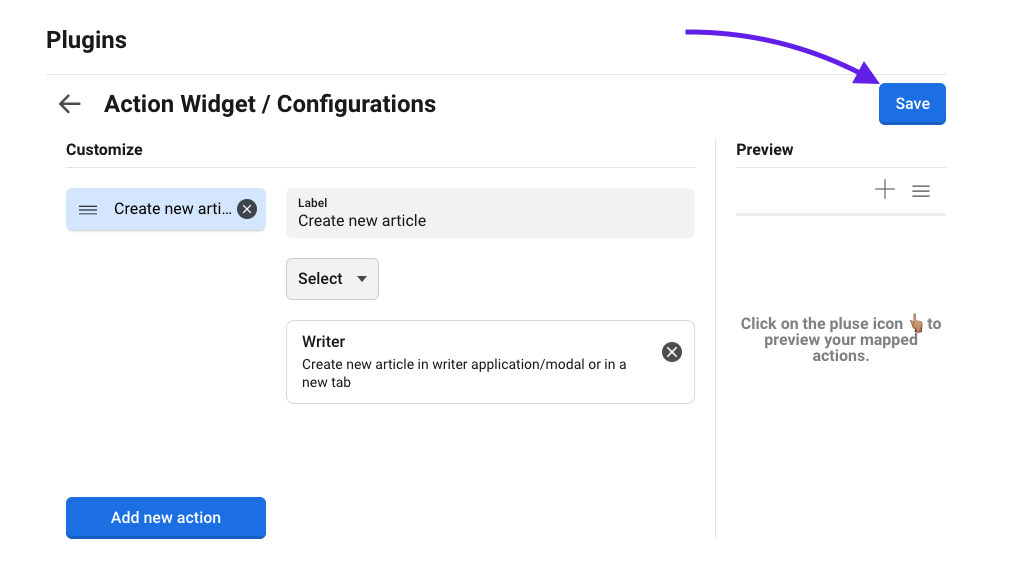
When this is done, activate the plugin and head into its configuration.
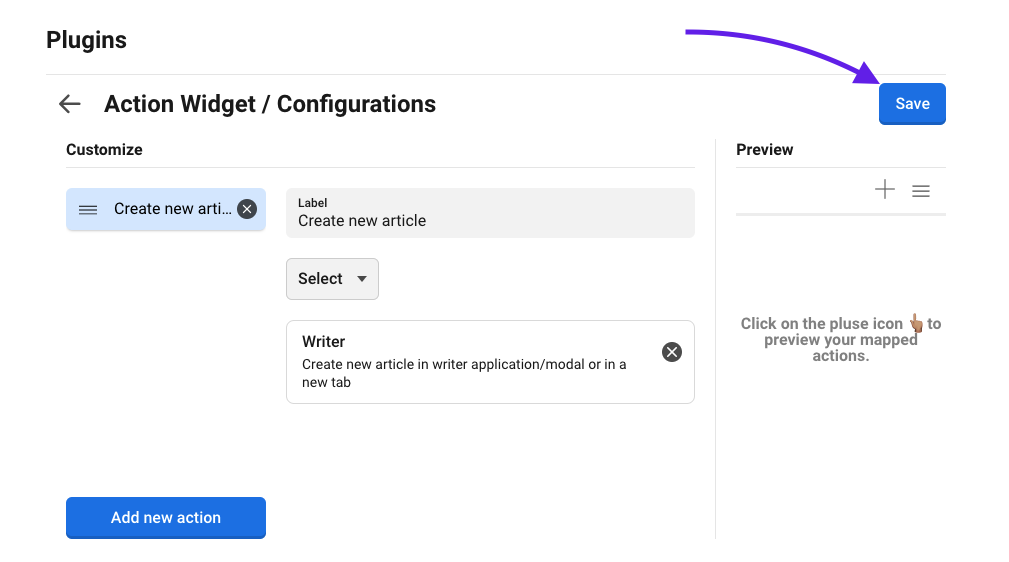
> Click on **"Add new action"** to start the addition of a new action
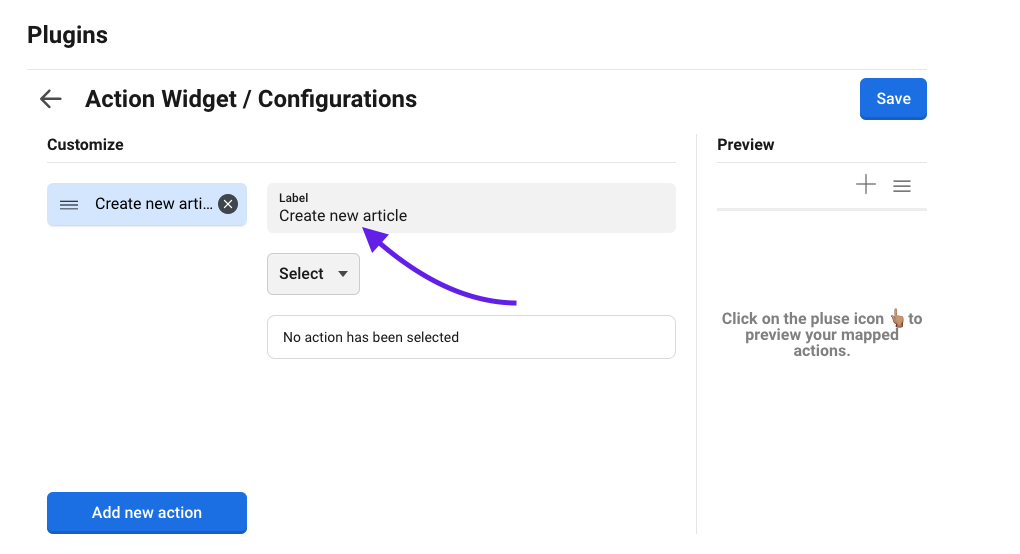
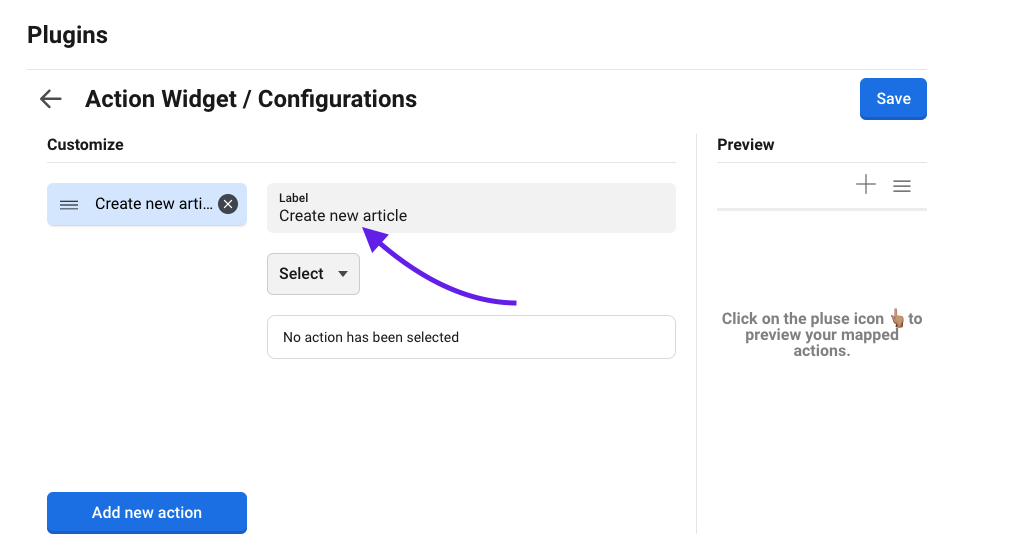
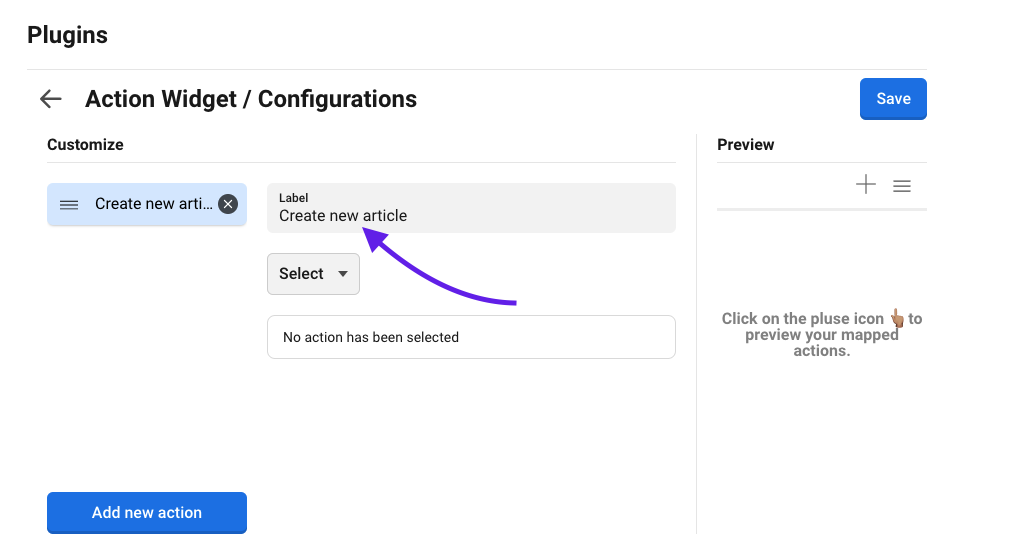
> Add a label explaining what the action will do
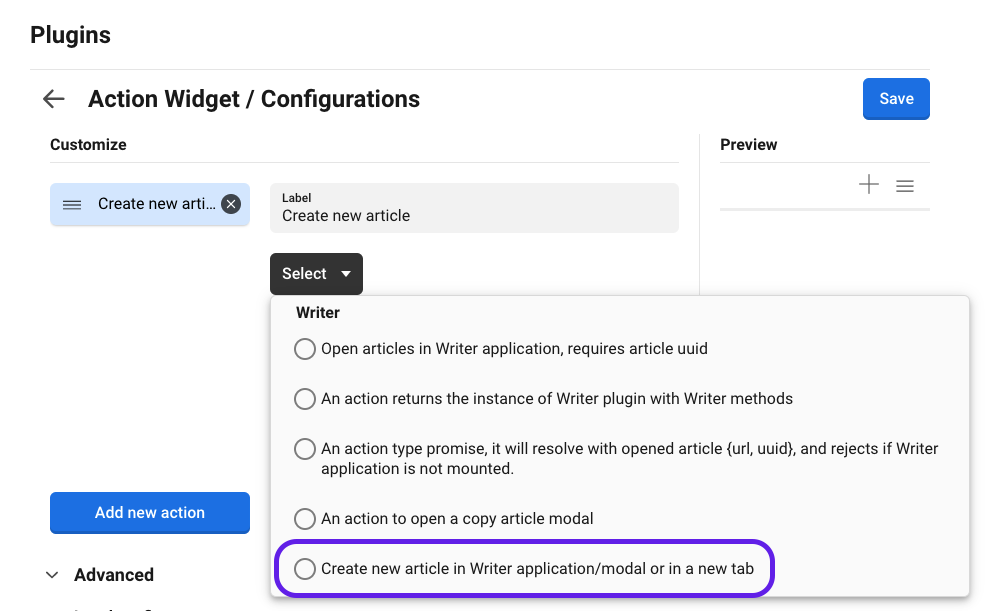
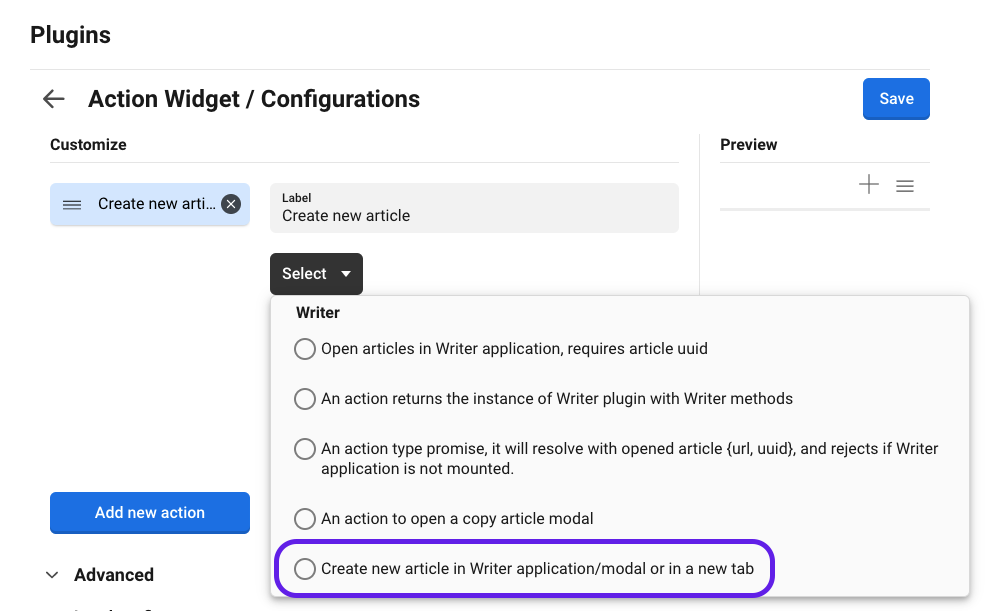
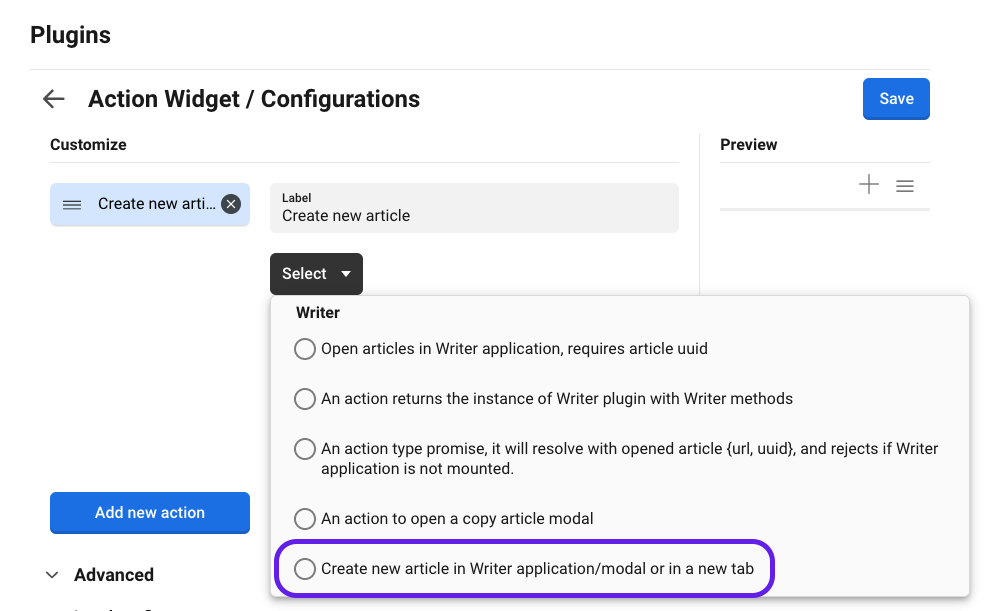
> In the dropdown select the action **"Create new article in Writer application/modal or in a new tab"**.
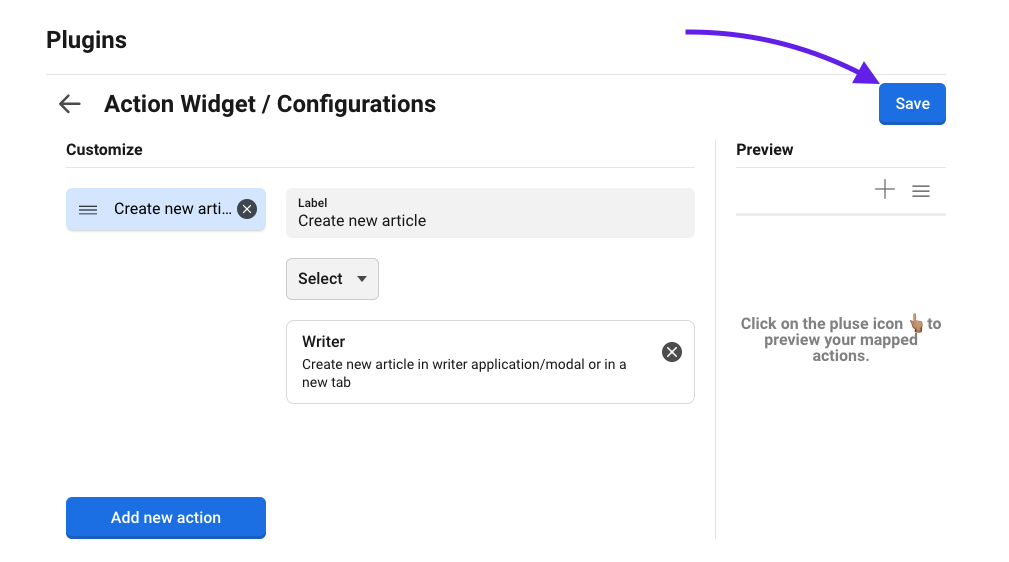
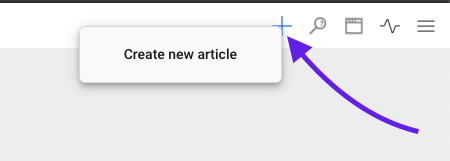
> Save your newly created action
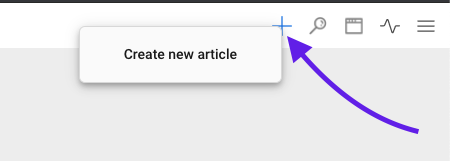
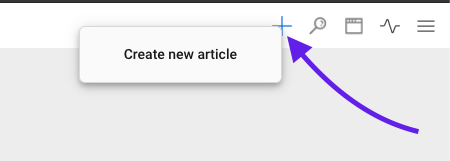
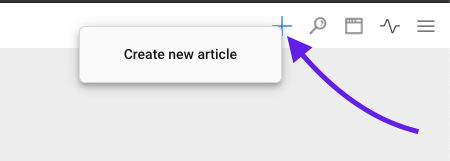
> It will now be available through the **"+"** widget button
# v4 => v5
## ICP

ICP Writer provider, the name of the provider that Writer will utilise for rendering images.\
`Default value is:`` `**`writer`**
\
If [Image Content Provider (ICP) 1.3.0](https://docs.navigaglobal.com/image-content-provider/) or later is installed this provider should be installed and ready to use with default value, otherwise the provider named above must be [configured](https://docs.navigaglobal.com/image-content-provider/config/default-config) in ICP.
# Develop with Writer
How to use Writer functionality in your plugin
### Getting started
Writer plugin gives you methods to use in your plugin to open articles in Writer application if it's mounted in the same workspace along your plugin, or open an article with the Naviga writer in a new tab.
Writer register its own methods with [Dashboard Actions](https://docs.navigaglobal.com/dashboard-plugin/components/agent/actions)
In order to utilise these methods your should look into adding them as requirements to your plugin in order to bind them to a unique identifier of your own. [Read more here](https://docs.navigaglobal.com/dashboard-plugin/api-and-gui/api/register/requirements#actions)
In following segment you will learn how to work with these different methods.
# Create
| | |
| ----------- | -------------------------------------------------------------- |
| id | com.naviga.writer-create-new-article |
| description | Create new article in Writer application/modal or in a new tab |
```jsx
import { Plugin, Utility } from '@root'
const MyAwesomeComponent = props => {
const createNewArticle = Utility.useLazyRef(() => {
return Plugin.getAction('your-bounded-action-id')
})
createNewArticle.current()
/**
Depending on current settings active in your plugin it will either open a new
article in a new tab or a modal. If Writer plugin is active in current
workspace the new article will open within that plugin.
*/
}
```
# Open
| | |
| ----------- | --------------------------------------------------------- |
| id | com.naviga.openArticle |
| description | Open article in Writer application, requires article uuid |
If Writer application is running in the same workspace as the plugin calling the action, the article will be opened in the writer application tied to that workspace.
{% tabs %}
{% tab title="Hook" %}
```javascript
import { Plugin, Utility } from '@root'
const MyAwesomeComponent = props => {
const openArticle = Utility.useLazyRef(() => {
return Plugin.getAction('your-bounded-action-id')
})
openArticle.current({
uuid: '838d42cf-507a-c701-f46d-6cd0a738cca4'
})
}
```
{% endtab %}
{% tab title="Class" %}
```javascript
import { Component } from 'react'
import { Plugin } from '@root'
class MyAwesomeComponent extends Component {
constructor(props) {
super(props)
this.openArticle = null
}
componentDidMount() {
const openArticleAction = Plugin.getAction('your-bounded-action-id')
this.openArticle = openArticleAction
}
/**
const article = {
uuid: '838d42cf-507a-c701-f46d-6cd0a738cca4'
}
this.openArticle(article)
*/
}
```
{% endtab %}
{% endtabs %}
{% hint style="info" %}
If you call openArticle action while Writer plugin is not mounted, The requested article will open in a new tab
{% endhint %}
# Copy
| | |
| ----------- | -------------------------------------- |
| id | com.naviga.copyArticle |
| description | An action to open a copy article modal |
```javascript
import { Plugin, Utility } from '@root'
const MyAwesomeComponent = props => {
const copyArticle = Utility.useLazyRef(() => {
return Plugin.getAction('your-bounded-action-id')
})
/**
Now the action is bounded to the ref we can call it and pass in the uuid
of the article we want to copy. This will open up a modal with the article
and we are able to make changes directly to the copy
copyArticle.current("838d42cf-507a-c701-f46d-6cd0a738cca4")
*/
}
```
# Get article
| | |
| ----------- | -------------------------------------------------------------------------------------------------------------------------------------------------- |
| id | com.naviga.writer:get:article |
| description | Action which returns a promise that resolve to an object containing info about current open article. Rejects if Writer application is not mounted. |
```jsx
import { Plugin, Utility } from '@root'
const MyAwesomeComponent = props => {
const getArticle = Utility.useLazyRef(() => {
return Plugin.getAction('your-bounded-action-id')
})
const article = await getArticle.current()
console.log(article)
/**
{
"url": "https://writer-url.io/9b203557-09ea-4d4f-9361-87ed835dc7eb",
"uuid": "9b203557-09ea-4d4f-9361-87ed835dc7eb",
"name": "Current Name of the article",
"headline": "Current Headline of the article"
}
*/
}
```
{% hint style="info" %}
If you called get:article action while Writer plugin is not mounted, get:article action will reject the promise
{% endhint %}
# Get instance
| | |
| ----------- | ------------------------------------------------------------------- |
| id | com.naviga.writer:getWriterInstance |
| description | An action returns the instance of Writer plugin with Writer methods |
The instance object contains all the actions that's specified since before with the intention to get a single access point rather than retrieving multiple actions.
```javascript
{
article: {
create: () => void { /* creates a new article */ },
open: (uuid) => void { /* open article with passed uuid */ },
copy: (uuid) => void { /* opens a modal to make a copy of chosen article */ },
preview: (uuid) => void { /* opens a preview of chosen article */ }
},
config: {
get: () => Promise { /* get current writer configuration */ },
core: () => Object { /* get current writer core configuration */ },
additional: () => Object { /* get current writer configuration */ }
},
loadableComponents: {
config: (name) => Object { /* get the configuration for that loadable component */},
config: () => Array { /* get all loadable components config */}
}
}
```
{% hint style="warning" %}
**Preview** also has a second optional parameter. This is a function supposed to handle custom images in the case where current configured ICP does not match the one where the images of the preview are supposed to be fetched from.
{% endhint %}
```javascript
import { Plugin, Utility } from '@root'
const MyComponent = async (props) => {
const instance = Utility.useLazyRef(() => {
return Plugin.getAction('my-bound-action-id')
})
const articleUuid = '07a99d1a-3387-4cd6-bc64-c07f0062bb78'
// create
instance.current().article.create()
// open
instance.current().article.open(artilceUuid)
// copy
instance.current().article.copy(articleUuid)
// preview
instance.current().article.preview(articleUuid)
// preview with optional image generator
instance.current().article.preview(articleUuid, data => {
const {
uuid,
uri
} = data
return {
url: functionToGenerateImageUrl(uuid, uri)
}
})
// get writer config
const config = await instance.current().config.get()
// get all loadable component config
const loadableComponentConfigs = instance.curent().loadableComponents.config()
// get Article size loadable component config
const articleSizeLoadableComponentConfig = instance.curent().loadableComponents.config('ArticleSize)
}
```
# Browser Policies chrome v142.x and above
Writer version 5.1.7 handles the scenario of writer plugins not loaded with local network due to stricter security policies in newer chrome versions regarding iframe loading from local networks.
* Resolved the issue where loading plugins from local addresses (e.g. `http://localhost:3000/plugin-name.js`) was broken in **Chrome** and **Microsoft Edge** (v142.x or higher).
* Issue is now handled in the code by passing the `allow="local-network-access"` attribute in the iframe, which ensures local network resources can be accessed securely.
* Local plugin loading now works as expected in DW (Dashboard Writer) without requiring temporary workarounds or Chrome flag modifications.
This update restores local plugin functionality and resolves the issue for all affected users.
# How unique writer users counted in billing report
In Writer version 5.1.8, Fixed an issue where users opening articles via the Writer modal popup were not counted, causing discrepancies between Dashboard and Billing reports.
* Unique user tracking now includes all access points of writer: **modal popup, workspace, shared URLs, My Assignment workspace and browser/external tabs**, ensuring aligned reporting.
* A unique user is counted once per **monthly billing cycle** if an article is opened for **at least 10 seconds**, regardless of repeated access.
# About
Dashboard - Writer
{% hint style="info" %}
The Writer plugin in the Dashboard is a bridge between the Dashboard and the Writer. For more in depth information and want to know more about the Writer go to:
{% endhint %}
### Description
Embed the Naviga Writer directly into your Dashboard.
# Changelog
{% hint style="success" %}
## 5.1.8 (2026-05-19)
### Fixed
* [Unique User Count Discrepancy in Writer Billing Reports](/dashboard-writer/developer/how-unique-writer-users-counted-in-billing-report)
{% endhint %}
{% hint style="info" %}
## 5.1.7 (2025-12-15)
### Added
* [Logs API integration](/dashboard-writer/admin/config/logs-api)
### Fixed
* [Writer plugins not loaded with local network due to stricter security policies in latest Chrome and Edge (v142.x and Above)](/dashboard-writer/developer/browser-policies-chrome-v142.x-and-above)
{% endhint %}
{% hint style="info" %}
## 5.1.6 (2025-06-13)
### Added
* Support for Image Suggest Search feature in Writer Plugin im-navigaphotos 1.2.0
### Fixed
* Vulnerability fixes for SOC compliance
{% endhint %}
{% hint style="info" %}
## 5.1.5 (2025-03-12)
### Added
* Support for OC List Clear Jump data for drag and drop the article
* Support for Clear the Jump data for coping the article in dashboard plugin
* Esc key support to close writer when in modal view
* Numpad shortcut support for Writer
{% endhint %}
{% hint style="info" %}
## 5.1.4 (2024-09-05)
### Added
* Registered action and event for image search modal
### Fixed
* Duplicating copy of article fails because of assignment link with no uuid / incorrect assignment link in article xml
* PageHub - hide open in writer optional and close article preview modal on esc key
{% endhint %}
{% hint style="info" %}
## 5.1.3 (2024-03-27)
### Fixed
* Include author data in article xml when article created from assignment and article author differ from assignee
* Support for Danish Translation
{% endhint %}
{% hint style="info" %}
## 5.1.2 (2023-12-19)
### Fixed
* Browser tab title gets updated with Article headline instead of Dashboard in NRP standalone mode
* Dashboard throws an error and the copy fails when an article with related geodata is copied via Article Search or Pub Planner
{% endhint %}
{% hint style="info" %}
## 5.1.1 (2023-03-28)
### **Added**
* UK/US Date Localization
### Fixed
* Articles do not load when opened directly in external tab
* Copy and edit from Article Search or Publication Planner opens empty article
* Image gallery drag and drop blank caption issue
* Copy of an article in article search, the link to the assignment should be removed
* Can save event, plan and assignment without a title
* Can not add a title if the story in Wire has no Headline
* Use article names on tabs when in "stand alone" mode
* Articles do not load when opened directly in external tab with a user that has more than one author mapped
{% endhint %}
{% hint style="info" %}
## 5.1.0 (2022-09-12)
### Added
* Unit-scoped Access Token support
{% endhint %}
{% hint style="info" %}
## 5.0.1 (2022-04-12)
### Fixed
* Issue with user selection in article preview
{% endhint %}
{% hint style="info" %}
## 4.2.1 (2022-04-12)
Fixed
* Issue with user selection in article preview (back ported)
{% endhint %}
{% hint style="info" %}
## 4.2.0 (2022-03-22)
### Added
* Ability to store author data on author links when copying articles ([requires configuration](/dashboard-writer/admin/config/copy-articles#store-author-data))
* Support for XML when copying and handling articles
* Support for exporting loadable components config
* Article size and scheduled publication as loadable components
### Fixed
* Issue with remove itemMetaExtProperty in Advanced copy article
{% endhint %}
{% hint style="info" %}
## 4.1.0 (2021-06-07)
### Changed
* Tabs style
### Fixed
* Characters count in Preview with "inline notes"
### Updated
* dependencies
{% endhint %}
{% hint style="info" %}
## 4.0.0 (2021-04-27)
### Added
* Ability to configure if Concept relations should be stored
* Action to open Article preview in a modal
* Action to get Writer Instance
### Changed
* New improved communication setup to better handle internal redirects/reloads in the Writer
### Fixed
* Better performance when running multiple tabs at once
### Removed
* Create new article Widget in the top menu bar has been removed *(should utilise* [*Action Widget*](https://docs.navigaglobal.com/dashboard-action-widget/) *to create article instead)*
{% endhint %}
{% hint style="info" %}
## 3.0.0 / 2.2.0 (2021-03-26)
### **Added**
* Article copy modal/portal/functionality.
* Article preview portal component.
* Article model.
### **Fixed**
* Confirm on going back on browser history if an Article has un-saved changes within a Modal.
### **Removed**
* Notifications requirements from Plugin Mappings.
{% endhint %}
{% hint style="info" %}
## 2.1.0 (2020-09-23)
**Fixed**
* Issue where Writer plugin get stuck in an "un-saved" state when duplicating an article from the Writer.
* Creating new articles from Widget doesn't work when saving a draft article.
**Added**
* An action to create new articles to be triggered from Action Widget
{% endhint %}
{% hint style="info" %}
## 2.0.0 (2020-08-24)
The major version has nothing to do with config changes but rather utilising the new Dashboard 4.0 plugin API. *(Can only be run on Dashboards version 4.0 and higher)*
**Fixed**
* Issue with opening articles in external window from modal when a new article being saved.
* Confirm before close if the Article has unsaved changes when editing inside a modal.
**Changed**
* Plugin-API to utilise the new API from DB v4.
{% endhint %}
{% hint style="info" %}
## 1.4.0 (2020-02-19)
### Added
* Default configuration with DB key store value
{% endhint %}
{% hint style="info" %}
## 1.3.4 (2019-11-28)
### Fixed
* functionality to stop the user from closing the writer if there is changes to the article while the writer is opened in a modal
{% endhint %}
{% hint style="info" %}
## 1.3.3 (2019-10-02)
### Fixed
* issue with writer close confirmation not working consistently in some browsers
{% endhint %}
{% hint style="info" %}
## 1.3.2 (2019-10-01)
### Fixed
* issue with not all content displaying while running writer with tabs
{% endhint %}
{% hint style="info" %}
## 1.3.1 (2019-09-17)
### Fixed
* issue when changing dashboard language to a not supported one by the plugin
{% endhint %}
{% hint style="info" %}
## **1.3.0 (2019-08-06)**
### Fixed
* Opening articles from other plugins without having the Tabs active.
{% endhint %}
{% hint style="info" %}
## **1.2.0 (2019-08-06)**
### Added
* Hashtag before article uuid when trying to open any article.
{% endhint %}
{% hint style="info" %}
## **1.1.0 (2019-08-05)**
### Added
* Names for required actions for plugin Mappings.
{% endhint %}
{% hint style="info" %}
## **1.0.0 (2019-07-31)**
### Changed
* Removed all events listeners and replaced with Dashboard actions.
### Added
* Config to display either Article's `headline` or Article's `name` as the tab title if Tabs are active.
### Fixed
* Displaying the full tab title if it's possible.
{% endhint %}
###
# How to
# Chrome v142.x & above
User inputs while logging in from Chrome browser v142.x and above which contain local area network security fixes.
With the upgrade to version 5.1.7 the user will see a pop-up when loging in first time to writer applications that are called internally by dashboard, such as NP Job plugin.\
\
The user will need to select allow in that case when prompted.
Note: There is no need to set **chrome://flags#local-network-access-check : Disabled** when upgraded.
# Config
### **Configured with a Writer endpoint**
* in your Dashboard go to > plugins > Writer > settings.
* and add Writer endpoint url, `example: https://writer.demo.imit.infomaker.io`
* and then click save.

### **Mappings**
Writer plugin require mappings for:
* **Image Content Provider:** in order to handle images for article preview
* **Content Agent:** in order to fetch/write with CCA
* **Status Map**: in order to set statuses on copied articles
In your Dashboard go to `plugins > Writer > settings > mappings`
### **Activate Writer-Tabs**
* in your Dashboard after you have installed Writer Plugin go to > `Dashboard menu > Application settings`
* in Writer Plugin settings, click on writer tabs switch button.
* and then click save, to save the changes.

### **Choose Tab title value**
Now you can choose between Article's headline and Article's name to be as a Tab title when you have your Tabs active
* in your Dashboard after you have installed Writer Plugin go to > Store > Writer plugin.
* Click on settings button.
* You will See at the bottom of the Settings section two options that you can select from
* Select your option and click on save

### Update Dashboard plugin in Writer
To test the new Dashboard integration plugin in your Writer:
* Go to your Writer endpoint.
* Go to your settings by pressing `CMD + shift + Y` in Mac or `Ctrl + shift + Y` in Windows.
* Find and remove the old plugin with name: `dashboardintegration`.
* Add a new plugin with the following settings:
* Id: `io.infomaker.dashboard`
* Name: `dw-plugin-dashboard`
* Plugin src url:
* `https://plugins.writer.infomaker.io/v1/infomaker/dw-plugin-dashboard/{PLUGIN_VERSION}/index.js`
* Plugin css url: `https://plugins.writer.infomaker.io/v1/infomaker/dw-plugin-dashboard/{PLUGIN_VERSION}/style.css`
* Then enable the new plugin by activate the enable switch button.
> [See Dashboard plugin configuration](https://plugins.writer.infomaker.io/v1/infomaker/im-dashboard-integration/latest/README.html)
> [See Dashboard plugin versions](https://plugins.writer.infomaker.io/v1/infomaker/im-dashboard-integration/latest/VERSIONS.html)
# Store author data
From Writer 4.2.0 we added the ability to store author data on the data node of the author link. In order to do this following step needs to be made.
* Add `WRITER_CONCEPTS_TEMPLATE_URL` to config key store with following value depending on environment:
* Stage:
* Prod:
After this is done all article creation that's being handled by this plugin will append concept data onto the author link in the document.
# Writer 7 and later
This page explains what configuration is needed for the Writer Dashboard plugin to work with Writer 7 and later
If you are running Writer 7, you will need to make some additional settings in Writer settings.
### Key Store values to be added (if not already added)
Before doing this, you will also need to add new "Key Store" values:
| Key name | Key Value |
| --------------------- | -------------------------------------------------------------------------------------------------------------------------- |
| WRITER\_RESOLVER\_URL | \* |
| WRITER\_ROUTER\_URL | [https://writer-router-eu-west-1.saas-prod.infomaker.io](<
https://writer-router-eu-west-1.saas-prod.infomaker.io>) \* |
\*) Depending on environment typ (production, stage) change `prod` to `stage` if necessary. \
\*\*) The URL is dependent on Naviga deployments per region and the actual link will differ.
### Writer configuration / settings
Flip the switches for "Use SaaS Endpoints …" as well as "Use proxy for Writer requests". Fill in the key values as stated below.
```
You will need the folllowing "keys":
Writer Resolver URL
${DBKS:WRITER_RESOLVER_URL}
Writer Router UR
${DBKS:WRITER_ROUTER_URL}
```

# Writer 8 and later
Here you control on how handling integration between Writer and Dashboard
### Configuration tab
ICP Writer provider, the name of the provider that Writer will utilise for rendering images.\
Default value is: **writer**\
If [Image Content Provider (ICP) 1.3.0](https://docs.navigaglobal.com/image-content-provider/) or later is installed this provider should be installed and ready to use with default value, otherwise the provider named above must be [configured](https://docs.navigaglobal.com/image-content-provider/config/default-config) in ICP.
### Integration tab
Decide on how images should be handled when used in Writer.\
Default value is: **Always show upload dialog**
### **Mappings**
Photos metadata preview\
Photos metadata validation\
Photos metadata edit\
Photos download image\
Photos upload image
These mappings are all marked as optional but are **required** if you are using Writer 8 since Writer 8 is using Naviga Photos to handle binary files such as images.\
And if these are to be used, [Naviga Photos 3](https://docs.navigaglobal.com/naviga-photos/3.0.0-4/) or later is required.
\
# Structure
Here you decide what fields to use when creating, copying or changing an article.
In some places the user can choose to create or copy an article. A modal is opened. Here is the place where you set which fields the user will see in those modals, regarding the article, and be able to fill these with data.
1. Drag the fields that you want to use from right to left into the box.
2. And then you can change the order of the fields by holding down the mouse button on the three lines to the left.
3. Some fields are configurable, if they are, they have a cog icon to the right if they are in the left box. By clicking the cog icon, you can change the configuration for that field.
4. You can remove a field by clicking on the remove icon.

# Article size
If you want to be able to set which size an article should have you need to configure this both in Dashboards Writer plugin and [in the configuration for the Writer](https://plugins.writer.infomaker.io/v1/infomaker/im-articlesize/latest/README.html).
You do this configuration under structure, you choose if you want to use it and which size is the default size.
# Copy articles
To enable the Copy Article feature in various plugins, the Writer plugin is needed, and configuration needs to be handled in advance.
{% hint style="info" %}
## Article Copy info
We now support XML handling with Article copy therefore we added a setting for changing the default storage provider.\
\
If default storage provider is set to CCA, you must be sure that content is CCA "compliant". This means, that before a you can activate and use the copy functionality, we need to verify your content with the Naviga backend team to make sure the article content is fully compliant with the CCA API and our new Naviga Doc format. In most cases, this is a straight forward process with no needed changes by you as a customer. In other cases this will require configuration by the backend team. We also know of some cases where there will be requirements to change how content is written, and for old content to be patched.
{% endhint %}
### **Mappings needed in Writer plugin**

### **Needed changes in Content Agent**
Unless you have already configured Content Agent for CCA, you will need to make changes in the Content Agent plugin. Here is an example of such configuration:
```javascript
{
"ca-provider": {
"default": true,
"cca": {
"baseUrl": "${DBKS:CCA_URL}"
},
"opencontent": {
"host": "${DBKS:CA_OC_PROVIDER_URL}"
},
[...]
}
}
```
```javascript
baseURL
${DBKS:CCA_URL}
KeyStore name: CCA_URL
Key Value: https://cca-eu-west-1.saas-stage.infomaker.io/
```
### **Cleanup/remove**
It is possible to clean up the article when the copy is made, here is an example of such a cleanup. We'll be adding more examples and possibilities / restrictions:
```javascript
{
"remove": [
{
"element": "meta",
"data": [
"provider"
]
},
{
"element": "link",
"data": {
"rel": "mainchannel",
"type": "x-im/channel"
}
},
{
"element": "link",
"data": {
"rel": "channel",
"type": "x-im/channel"
}
},
{
"element": "link",
"data": {
"rel": "subject",
"type": "x-im/section"
}
},
{
"element": "itemMetaExtProperty",
"data": {
"type": "imext:header"
}
}
]
}
```
{% hint style="danger" %}
### News value related issue in the Writer
Currently there is an issue in the Writer, that requires a news value, and if it is not present the Writer will add it. This means, that if you remove it with code, the Writer will add it and the user will be prompted to save even if the user didn't make any changes. This is an issue we will be addressing, but for the time being we recommend not to remove the News Value.
{% endhint %}
```javascript
{
"element": "object",
"data": {
"type": "x-im/newsvalue"
}
}
```
### Plugin mappings
In each plugin that supports copying, you will also need to add the mapping for this feature

## Concept relations
When copying articles you're able to add additional concepts to the copy. With this new feature we also added functionality to allow for relations to be stored in the document. In order to allow this feature you need to turn it ON under "Copy Article" customisations.


### Store author data
New in Writer 4.2.0 we added the ability to store author data on the data node of the author link. In order to do this following step needs to be made.
* Add `WRITER_CONCEPTS_TEMPLATE_URL` to config key store with following value depending on environment:
* Stage:
* Prod:
# Logs API
Integrated the Logs API to capture and send errors to AWS CloudWatch whenever an API failure occurs or any code inside a try-catch block throws an error
This logging mechanism is **configurable** via the `enabled` flag (`true` or `false`) under the `logsApi` configuration.\
There is **no functional impact** from this change — it only adds optional error logging to AWS for better monitoring and debugging.
Sample configuration:
```
{
"host": "${DBKS:DB_LOG_URL}",
"enabled": true
}
```
**Configuration Details:**
`host` This field specifies the host url for the logs. host url will be available in dashboard config key store with key **DB\_LOG\_URL**
`enable` This field can be set either *True* or *False.* If set to true then it will capture and send errors to AWS CloudWatch for better monitoring and debugging. If set to false then errors would not be logged on AWS.
LogsAPI URL:\
1\. Stage - \
2\. Prod. - [https://db-plugin-logs-api-eu-west-1.saas-prod.infomaker.io/](https://db-plugin-logs-api-eu-west-1.saas-stage.infomaker.io/)
# Requirements
{% hint style="info" %}
## Article Copy info
We now support XML handling with Article copy therefore we added a setting for changing the default storage provider.\
\
If default storage provider is set to CCA, you must be sure that content is CCA "compliant". This means, that before a you can activate and use the copy functionality, we need to verify your content with the Naviga backend team to make sure the article content is fully compliant with the CCA API and our new Naviga Doc format. In most cases, this is a straight forward process with no needed changes by you as a customer. In other cases this will require configuration by the backend team. We also know of some cases where there will be requirements to change how content is written, and for old content to be patched.
{% endhint %}
## Actions
{% hint style="info" %}
### [Image Content Provider](https://docs.navigaglobal.com/image-content-provider/) *`>=`1.2.0*
*if used towards Writer 8 - version >=`1.3.0` is preferred.*
{% endhint %}
{% hint style="info" %}
### [Content Agent](https://docs.infomaker.io/content-agent/) *`>= 2.0.0`*
{% endhint %}
{% hint style="info" %}
### [Status Map](https://docs.infomaker.io/dashboard-status-map/) *`>= 2.0.0`*
{% endhint %}
# Migration
When upgrading the Writer plugin, you must make minor changes to mappings
##
# v3 => v4
## Integration
{% hint style="warning" %}
Dashboard Integration plugin in the Writer needs to be upgraded to at least version 3.0.0
{% endhint %}
## ICP
Since the addition of functionality to be able to preview articles through the writer plugin it now also requires a mapping towards ICP. The required mapping is the following:

## Widget
In version 4.0 we decided to remove the internal Widget housing the functionality to create an article (the airplane icon in the top menu). This due to the more generic `Action Widget` plugin solving the same problem. To yet again allow for creation of articles from the Widget bar you should follow these simple steps.
First install `Action Widget` plugin if you don't already have it installed. This could be found under the **Available Plugins** tab.
When this is done, activate the plugin and head into its configuration.
> Click on **"Add new action"** to start the addition of a new action
> Add a label explaining what the action will do
> In the dropdown select the action **"Create new article in Writer application/modal or in a new tab"**.
> Save your newly created action
> It will now be available through the **"+"** widget button
# v4 => v5
## ICP

ICP Writer provider, the name of the provider that Writer will utilise for rendering images.\
`Default value is:`` `**`writer`**
\
If [Image Content Provider (ICP) 1.3.0](https://docs.navigaglobal.com/image-content-provider/) or later is installed this provider should be installed and ready to use with default value, otherwise the provider named above must be [configured](https://docs.navigaglobal.com/image-content-provider/config/default-config) in ICP.
# Develop with Writer
How to use Writer functionality in your plugin
### Getting started
Writer plugin gives you methods to use in your plugin to open articles in Writer application if it's mounted in the same workspace along your plugin, or open an article with the Naviga writer in a new tab.
Writer register its own methods with [Dashboard Actions](https://docs.navigaglobal.com/dashboard-plugin/components/agent/actions)
In order to utilise these methods your should look into adding them as requirements to your plugin in order to bind them to a unique identifier of your own. [Read more here](https://docs.navigaglobal.com/dashboard-plugin/api-and-gui/api/register/requirements#actions)
In following segment you will learn how to work with these different methods.
# Create
| | |
| ----------- | -------------------------------------------------------------- |
| id | com.naviga.writer-create-new-article |
| description | Create new article in Writer application/modal or in a new tab |
```jsx
import { Plugin, Utility } from '@root'
const MyAwesomeComponent = props => {
const createNewArticle = Utility.useLazyRef(() => {
return Plugin.getAction('your-bounded-action-id')
})
createNewArticle.current()
/**
Depending on current settings active in your plugin it will either open a new
article in a new tab or a modal. If Writer plugin is active in current
workspace the new article will open within that plugin.
*/
}
```
# Open
| | |
| ----------- | --------------------------------------------------------- |
| id | com.naviga.openArticle |
| description | Open article in Writer application, requires article uuid |
If Writer application is running in the same workspace as the plugin calling the action, the article will be opened in the writer application tied to that workspace.
{% tabs %}
{% tab title="Hook" %}
```javascript
import { Plugin, Utility } from '@root'
const MyAwesomeComponent = props => {
const openArticle = Utility.useLazyRef(() => {
return Plugin.getAction('your-bounded-action-id')
})
openArticle.current({
uuid: '838d42cf-507a-c701-f46d-6cd0a738cca4'
})
}
```
{% endtab %}
{% tab title="Class" %}
```javascript
import { Component } from 'react'
import { Plugin } from '@root'
class MyAwesomeComponent extends Component {
constructor(props) {
super(props)
this.openArticle = null
}
componentDidMount() {
const openArticleAction = Plugin.getAction('your-bounded-action-id')
this.openArticle = openArticleAction
}
/**
const article = {
uuid: '838d42cf-507a-c701-f46d-6cd0a738cca4'
}
this.openArticle(article)
*/
}
```
{% endtab %}
{% endtabs %}
{% hint style="info" %}
If you call openArticle action while Writer plugin is not mounted, The requested article will open in a new tab
{% endhint %}
# Copy
| | |
| ----------- | -------------------------------------- |
| id | com.naviga.copyArticle |
| description | An action to open a copy article modal |
```javascript
import { Plugin, Utility } from '@root'
const MyAwesomeComponent = props => {
const copyArticle = Utility.useLazyRef(() => {
return Plugin.getAction('your-bounded-action-id')
})
/**
Now the action is bounded to the ref we can call it and pass in the uuid
of the article we want to copy. This will open up a modal with the article
and we are able to make changes directly to the copy
copyArticle.current("838d42cf-507a-c701-f46d-6cd0a738cca4")
*/
}
```
# Get article
| | |
| ----------- | -------------------------------------------------------------------------------------------------------------------------------------------------- |
| id | com.naviga.writer:get:article |
| description | Action which returns a promise that resolve to an object containing info about current open article. Rejects if Writer application is not mounted. |
```jsx
import { Plugin, Utility } from '@root'
const MyAwesomeComponent = props => {
const getArticle = Utility.useLazyRef(() => {
return Plugin.getAction('your-bounded-action-id')
})
const article = await getArticle.current()
console.log(article)
/**
{
"url": "https://writer-url.io/9b203557-09ea-4d4f-9361-87ed835dc7eb",
"uuid": "9b203557-09ea-4d4f-9361-87ed835dc7eb",
"name": "Current Name of the article",
"headline": "Current Headline of the article"
}
*/
}
```
{% hint style="info" %}
If you called get:article action while Writer plugin is not mounted, get:article action will reject the promise
{% endhint %}
# Get instance
| | |
| ----------- | ------------------------------------------------------------------- |
| id | com.naviga.writer:getWriterInstance |
| description | An action returns the instance of Writer plugin with Writer methods |
The instance object contains all the actions that's specified since before with the intention to get a single access point rather than retrieving multiple actions.
```javascript
{
article: {
create: () => void { /* creates a new article */ },
open: (uuid) => void { /* open article with passed uuid */ },
copy: (uuid) => void { /* opens a modal to make a copy of chosen article */ },
preview: (uuid) => void { /* opens a preview of chosen article */ }
},
config: {
get: () => Promise { /* get current writer configuration */ },
core: () => Object { /* get current writer core configuration */ },
additional: () => Object { /* get current writer configuration */ }
},
loadableComponents: {
config: (name) => Object { /* get the configuration for that loadable component */},
config: () => Array { /* get all loadable components config */}
}
}
```
{% hint style="warning" %}
**Preview** also has a second optional parameter. This is a function supposed to handle custom images in the case where current configured ICP does not match the one where the images of the preview are supposed to be fetched from.
{% endhint %}
```javascript
import { Plugin, Utility } from '@root'
const MyComponent = async (props) => {
const instance = Utility.useLazyRef(() => {
return Plugin.getAction('my-bound-action-id')
})
const articleUuid = '07a99d1a-3387-4cd6-bc64-c07f0062bb78'
// create
instance.current().article.create()
// open
instance.current().article.open(artilceUuid)
// copy
instance.current().article.copy(articleUuid)
// preview
instance.current().article.preview(articleUuid)
// preview with optional image generator
instance.current().article.preview(articleUuid, data => {
const {
uuid,
uri
} = data
return {
url: functionToGenerateImageUrl(uuid, uri)
}
})
// get writer config
const config = await instance.current().config.get()
// get all loadable component config
const loadableComponentConfigs = instance.curent().loadableComponents.config()
// get Article size loadable component config
const articleSizeLoadableComponentConfig = instance.curent().loadableComponents.config('ArticleSize)
}
```
# Browser Policies chrome v142.x and above
Writer version 5.1.7 handles the scenario of writer plugins not loaded with local network due to stricter security policies in newer chrome versions regarding iframe loading from local networks.
* Resolved the issue where loading plugins from local addresses (e.g. `http://localhost:3000/plugin-name.js`) was broken in **Chrome** and **Microsoft Edge** (v142.x or higher).
* Issue is now handled in the code by passing the `allow="local-network-access"` attribute in the iframe, which ensures local network resources can be accessed securely.
* Local plugin loading now works as expected in DW (Dashboard Writer) without requiring temporary workarounds or Chrome flag modifications.
This update restores local plugin functionality and resolves the issue for all affected users.
# How unique writer users counted in billing report
In Writer version 5.1.8, Fixed an issue where users opening articles via the Writer modal popup were not counted, causing discrepancies between Dashboard and Billing reports.
* Unique user tracking now includes all access points of writer: **modal popup, workspace, shared URLs, My Assignment workspace and browser/external tabs**, ensuring aligned reporting.
* A unique user is counted once per **monthly billing cycle** if an article is opened for **at least 10 seconds**, regardless of repeated access.
# About
Dashboard - Writer
{% hint style="info" %}
The Writer plugin in the Dashboard is a bridge between the Dashboard and the Writer. For more in depth information and want to know more about the Writer go to:
{% endhint %}
### Description
Embed the Naviga Writer directly into your Dashboard.
# Changelog
{% hint style="success" %}
## 5.1.7 (2025-12-15)
### Added
* [Logs API integration](/dashboard-writer/5.1.7/admin/config/logs-api)
### Fixed
* [Writer plugins not loaded with local network due to stricter security policies in latest Chrome and Edge (v142.x and Above)](/dashboard-writer/5.1.7/developer/browser-policies-chrome-v142.x-and-above)
{% endhint %}
{% hint style="info" %}
## 5.1.6 (2025-06-13)
### Added
* Support for Image Suggest Search feature in Writer Plugin im-navigaphotos 1.2.0
### Fixed
* Vulnerability fixes for SOC compliance
{% endhint %}
{% hint style="info" %}
## 5.1.5 (2025-03-12)
### Added
* Support for OC List Clear Jump data for drag and drop the article
* Support for Clear the Jump data for coping the article in dashboard plugin
* Esc key support to close writer when in modal view
* Numpad shortcut support for Writer
{% endhint %}
{% hint style="info" %}
## 5.1.4 (2024-09-05)
### Added
* Registered action and event for image search modal
### Fixed
* Duplicating copy of article fails because of assignment link with no uuid / incorrect assignment link in article xml
* PageHub - hide open in writer optional and close article preview modal on esc key
{% endhint %}
{% hint style="info" %}
## 5.1.3 (2024-03-27)
### Fixed
* Include author data in article xml when article created from assignment and article author differ from assignee
* Support for Danish Translation
{% endhint %}
{% hint style="info" %}
## 5.1.2 (2023-12-19)
### Fixed
* Browser tab title gets updated with Article headline instead of Dashboard in NRP standalone mode
* Dashboard throws an error and the copy fails when an article with related geodata is copied via Article Search or Pub Planner
{% endhint %}
{% hint style="info" %}
## 5.1.1 (2023-03-28)
### **Added**
* UK/US Date Localization
### Fixed
* Articles do not load when opened directly in external tab
* Copy and edit from Article Search or Publication Planner opens empty article
* Image gallery drag and drop blank caption issue
* Copy of an article in article search, the link to the assignment should be removed
* Can save event, plan and assignment without a title
* Can not add a title if the story in Wire has no Headline
* Use article names on tabs when in "stand alone" mode
* Articles do not load when opened directly in external tab with a user that has more than one author mapped
{% endhint %}
{% hint style="info" %}
## 5.1.0 (2022-09-12)
### Added
* Unit-scoped Access Token support
{% endhint %}
{% hint style="info" %}
## 5.0.1 (2022-04-12)
### Fixed
* Issue with user selection in article preview
{% endhint %}
{% hint style="info" %}
## 4.2.1 (2022-04-12)
Fixed
* Issue with user selection in article preview (back ported)
{% endhint %}
{% hint style="info" %}
## 4.2.0 (2022-03-22)
### Added
* Ability to store author data on author links when copying articles ([requires configuration](/dashboard-writer/5.1.7/admin/config/copy-articles#store-author-data))
* Support for XML when copying and handling articles
* Support for exporting loadable components config
* Article size and scheduled publication as loadable components
### Fixed
* Issue with remove itemMetaExtProperty in Advanced copy article
{% endhint %}
{% hint style="info" %}
## 4.1.0 (2021-06-07)
### Changed
* Tabs style
### Fixed
* Characters count in Preview with "inline notes"
### Updated
* dependencies
{% endhint %}
{% hint style="info" %}
## 4.0.0 (2021-04-27)
### Added
* Ability to configure if Concept relations should be stored
* Action to open Article preview in a modal
* Action to get Writer Instance
### Changed
* New improved communication setup to better handle internal redirects/reloads in the Writer
### Fixed
* Better performance when running multiple tabs at once
### Removed
* Create new article Widget in the top menu bar has been removed *(should utilise* [*Action Widget*](https://docs.navigaglobal.com/dashboard-action-widget/) *to create article instead)*
{% endhint %}
{% hint style="info" %}
## 3.0.0 / 2.2.0 (2021-03-26)
### **Added**
* Article copy modal/portal/functionality.
* Article preview portal component.
* Article model.
### **Fixed**
* Confirm on going back on browser history if an Article has un-saved changes within a Modal.
### **Removed**
* Notifications requirements from Plugin Mappings.
{% endhint %}
{% hint style="info" %}
## 2.1.0 (2020-09-23)
**Fixed**
* Issue where Writer plugin get stuck in an "un-saved" state when duplicating an article from the Writer.
* Creating new articles from Widget doesn't work when saving a draft article.
**Added**
* An action to create new articles to be triggered from Action Widget
{% endhint %}
{% hint style="info" %}
## 2.0.0 (2020-08-24)
The major version has nothing to do with config changes but rather utilising the new Dashboard 4.0 plugin API. *(Can only be run on Dashboards version 4.0 and higher)*
**Fixed**
* Issue with opening articles in external window from modal when a new article being saved.
* Confirm before close if the Article has unsaved changes when editing inside a modal.
**Changed**
* Plugin-API to utilise the new API from DB v4.
{% endhint %}
{% hint style="info" %}
## 1.4.0 (2020-02-19)
### Added
* Default configuration with DB key store value
{% endhint %}
{% hint style="info" %}
## 1.3.4 (2019-11-28)
### Fixed
* functionality to stop the user from closing the writer if there is changes to the article while the writer is opened in a modal
{% endhint %}
{% hint style="info" %}
## 1.3.3 (2019-10-02)
### Fixed
* issue with writer close confirmation not working consistently in some browsers
{% endhint %}
{% hint style="info" %}
## 1.3.2 (2019-10-01)
### Fixed
* issue with not all content displaying while running writer with tabs
{% endhint %}
{% hint style="info" %}
## 1.3.1 (2019-09-17)
### Fixed
* issue when changing dashboard language to a not supported one by the plugin
{% endhint %}
{% hint style="info" %}
## **1.3.0 (2019-08-06)**
### Fixed
* Opening articles from other plugins without having the Tabs active.
{% endhint %}
{% hint style="info" %}
## **1.2.0 (2019-08-06)**
### Added
* Hashtag before article uuid when trying to open any article.
{% endhint %}
{% hint style="info" %}
## **1.1.0 (2019-08-05)**
### Added
* Names for required actions for plugin Mappings.
{% endhint %}
{% hint style="info" %}
## **1.0.0 (2019-07-31)**
### Changed
* Removed all events listeners and replaced with Dashboard actions.
### Added
* Config to display either Article's `headline` or Article's `name` as the tab title if Tabs are active.
### Fixed
* Displaying the full tab title if it's possible.
{% endhint %}
###
# How to
# Chrome v142.x & above
User inputs while logging in from Chrome browser v142.x and above which contain local area network security fixes.
With the upgrade to version 5.1.7 the user will see a pop-up when loging in first time to writer applications that are called internally by dashboard, such as NP Job plugin.\
\
The user will need to select allow in that case when prompted.
Note: There is no need to set **chrome://flags#local-network-access-check : Disabled** when upgraded.
# Config
### **Configured with a Writer endpoint**
* in your Dashboard go to > plugins > Writer > settings.
* and add Writer endpoint url, `example: https://writer.demo.imit.infomaker.io`
* and then click save.

### **Mappings**
Writer plugin require mappings for:
* **Image Content Provider:** in order to handle images for article preview
* **Content Agent:** in order to fetch/write with CCA
* **Status Map**: in order to set statuses on copied articles
In your Dashboard go to `plugins > Writer > settings > mappings`
### **Activate Writer-Tabs**
* in your Dashboard after you have installed Writer Plugin go to > `Dashboard menu > Application settings`
* in Writer Plugin settings, click on writer tabs switch button.
* and then click save, to save the changes.

### **Choose Tab title value**
Now you can choose between Article's headline and Article's name to be as a Tab title when you have your Tabs active
* in your Dashboard after you have installed Writer Plugin go to > Store > Writer plugin.
* Click on settings button.
* You will See at the bottom of the Settings section two options that you can select from
* Select your option and click on save

### Update Dashboard plugin in Writer
To test the new Dashboard integration plugin in your Writer:
* Go to your Writer endpoint.
* Go to your settings by pressing `CMD + shift + Y` in Mac or `Ctrl + shift + Y` in Windows.
* Find and remove the old plugin with name: `dashboardintegration`.
* Add a new plugin with the following settings:
* Id: `io.infomaker.dashboard`
* Name: `dw-plugin-dashboard`
* Plugin src url:
* `https://plugins.writer.infomaker.io/v1/infomaker/dw-plugin-dashboard/{PLUGIN_VERSION}/index.js`
* Plugin css url: `https://plugins.writer.infomaker.io/v1/infomaker/dw-plugin-dashboard/{PLUGIN_VERSION}/style.css`
* Then enable the new plugin by activate the enable switch button.
> [See Dashboard plugin configuration](https://plugins.writer.infomaker.io/v1/infomaker/im-dashboard-integration/latest/README.html)
> [See Dashboard plugin versions](https://plugins.writer.infomaker.io/v1/infomaker/im-dashboard-integration/latest/VERSIONS.html)
# Store author data
From Writer 4.2.0 we added the ability to store author data on the data node of the author link. In order to do this following step needs to be made.
* Add `WRITER_CONCEPTS_TEMPLATE_URL` to config key store with following value depending on environment:
* Stage:
* Prod:
After this is done all article creation that's being handled by this plugin will append concept data onto the author link in the document.
# Writer 7 and later
This page explains what configuration is needed for the Writer Dashboard plugin to work with Writer 7 and later
If you are running Writer 7, you will need to make some additional settings in Writer settings.
### Key Store values to be added (if not already added)
Before doing this, you will also need to add new "Key Store" values:
| Key name | Key Value |
| --------------------- | -------------------------------------------------------------------------------------------------------------------------- |
| WRITER\_RESOLVER\_URL | \* |
| WRITER\_ROUTER\_URL | [https://writer-router-eu-west-1.saas-prod.infomaker.io](<
https://writer-router-eu-west-1.saas-prod.infomaker.io>) \* |
\*) Depending on environment typ (production, stage) change `prod` to `stage` if necessary. \
\*\*) The URL is dependent on Naviga deployments per region and the actual link will differ.
### Writer configuration / settings
Flip the switches for "Use SaaS Endpoints …" as well as "Use proxy for Writer requests". Fill in the key values as stated below.
```
You will need the folllowing "keys":
Writer Resolver URL
${DBKS:WRITER_RESOLVER_URL}
Writer Router UR
${DBKS:WRITER_ROUTER_URL}
```

# Writer 8 and later
Here you control on how handling integration between Writer and Dashboard
### Configuration tab
ICP Writer provider, the name of the provider that Writer will utilise for rendering images.\
Default value is: **writer**\
If [Image Content Provider (ICP) 1.3.0](https://docs.navigaglobal.com/image-content-provider/) or later is installed this provider should be installed and ready to use with default value, otherwise the provider named above must be [configured](https://docs.navigaglobal.com/image-content-provider/config/default-config) in ICP.
### Integration tab
Decide on how images should be handled when used in Writer.\
Default value is: **Always show upload dialog**
### **Mappings**
Photos metadata preview\
Photos metadata validation\
Photos metadata edit\
Photos download image\
Photos upload image
These mappings are all marked as optional but are **required** if you are using Writer 8 since Writer 8 is using Naviga Photos to handle binary files such as images.\
And if these are to be used, [Naviga Photos 3](https://docs.navigaglobal.com/naviga-photos/3.0.0-4/) or later is required.
\
# Structure
Here you decide what fields to use when creating, copying or changing an article.
In some places the user can choose to create or copy an article. A modal is opened. Here is the place where you set which fields the user will see in those modals, regarding the article, and be able to fill these with data.
1. Drag the fields that you want to use from right to left into the box.
2. And then you can change the order of the fields by holding down the mouse button on the three lines to the left.
3. Some fields are configurable, if they are, they have a cog icon to the right if they are in the left box. By clicking the cog icon, you can change the configuration for that field.
4. You can remove a field by clicking on the remove icon.

# Article size
If you want to be able to set which size an article should have you need to configure this both in Dashboards Writer plugin and [in the configuration for the Writer](https://plugins.writer.infomaker.io/v1/infomaker/im-articlesize/latest/README.html).
You do this configuration under structure, you choose if you want to use it and which size is the default size.
# Copy articles
To enable the Copy Article feature in various plugins, the Writer plugin is needed, and configuration needs to be handled in advance.
{% hint style="info" %}
## Article Copy info
We now support XML handling with Article copy therefore we added a setting for changing the default storage provider.\
\
If default storage provider is set to CCA, you must be sure that content is CCA "compliant". This means, that before a you can activate and use the copy functionality, we need to verify your content with the Naviga backend team to make sure the article content is fully compliant with the CCA API and our new Naviga Doc format. In most cases, this is a straight forward process with no needed changes by you as a customer. In other cases this will require configuration by the backend team. We also know of some cases where there will be requirements to change how content is written, and for old content to be patched.
{% endhint %}
### **Mappings needed in Writer plugin**

### **Needed changes in Content Agent**
Unless you have already configured Content Agent for CCA, you will need to make changes in the Content Agent plugin. Here is an example of such configuration:
```javascript
{
"ca-provider": {
"default": true,
"cca": {
"baseUrl": "${DBKS:CCA_URL}"
},
"opencontent": {
"host": "${DBKS:CA_OC_PROVIDER_URL}"
},
[...]
}
}
```
```javascript
baseURL
${DBKS:CCA_URL}
KeyStore name: CCA_URL
Key Value: https://cca-eu-west-1.saas-stage.infomaker.io/
```
### **Cleanup/remove**
It is possible to clean up the article when the copy is made, here is an example of such a cleanup. We'll be adding more examples and possibilities / restrictions:
```javascript
{
"remove": [
{
"element": "meta",
"data": [
"provider"
]
},
{
"element": "link",
"data": {
"rel": "mainchannel",
"type": "x-im/channel"
}
},
{
"element": "link",
"data": {
"rel": "channel",
"type": "x-im/channel"
}
},
{
"element": "link",
"data": {
"rel": "subject",
"type": "x-im/section"
}
},
{
"element": "itemMetaExtProperty",
"data": {
"type": "imext:header"
}
}
]
}
```
{% hint style="danger" %}
### News value related issue in the Writer
Currently there is an issue in the Writer, that requires a news value, and if it is not present the Writer will add it. This means, that if you remove it with code, the Writer will add it and the user will be prompted to save even if the user didn't make any changes. This is an issue we will be addressing, but for the time being we recommend not to remove the News Value.
{% endhint %}
```javascript
{
"element": "object",
"data": {
"type": "x-im/newsvalue"
}
}
```
### Plugin mappings
In each plugin that supports copying, you will also need to add the mapping for this feature

## Concept relations
When copying articles you're able to add additional concepts to the copy. With this new feature we also added functionality to allow for relations to be stored in the document. In order to allow this feature you need to turn it ON under "Copy Article" customisations.


### Store author data
New in Writer 4.2.0 we added the ability to store author data on the data node of the author link. In order to do this following step needs to be made.
* Add `WRITER_CONCEPTS_TEMPLATE_URL` to config key store with following value depending on environment:
* Stage:
* Prod:
# Logs API
Integrated the Logs API to capture and send errors to AWS CloudWatch whenever an API failure occurs or any code inside a try-catch block throws an error
This logging mechanism is **configurable** via the `enabled` flag (`true` or `false`) under the `logsApi` configuration.\
There is **no functional impact** from this change — it only adds optional error logging to AWS for better monitoring and debugging.
Sample configuration:
```
{
"host": "${DBKS:DB_LOG_URL}",
"enabled": true
}
```
**Configuration Details:**
`host` This field specifies the host url for the logs. host url will be available in dashboard config key store with key **DB\_LOG\_URL**
`enable` This field can be set either *True* or *False.* If set to true then it will capture and send errors to AWS CloudWatch for better monitoring and debugging. If set to false then errors would not be logged on AWS.
LogsAPI URL:\
1\. Stage - \
2\. Prod. - [https://db-plugin-logs-api-eu-west-1.saas-prod.infomaker.io/](https://db-plugin-logs-api-eu-west-1.saas-stage.infomaker.io/)
# Requirements
{% hint style="info" %}
## Article Copy info
We now support XML handling with Article copy therefore we added a setting for changing the default storage provider.\
\
If default storage provider is set to CCA, you must be sure that content is CCA "compliant". This means, that before a you can activate and use the copy functionality, we need to verify your content with the Naviga backend team to make sure the article content is fully compliant with the CCA API and our new Naviga Doc format. In most cases, this is a straight forward process with no needed changes by you as a customer. In other cases this will require configuration by the backend team. We also know of some cases where there will be requirements to change how content is written, and for old content to be patched.
{% endhint %}
## Actions
{% hint style="info" %}
### [Image Content Provider](https://docs.navigaglobal.com/image-content-provider/) *`>=`1.2.0*
*if used towards Writer 8 - version >=`1.3.0` is preferred.*
{% endhint %}
{% hint style="info" %}
### [Content Agent](https://docs.infomaker.io/content-agent/) *`>= 2.0.0`*
{% endhint %}
{% hint style="info" %}
### [Status Map](https://docs.infomaker.io/dashboard-status-map/) *`>= 2.0.0`*
{% endhint %}
# Migration
When upgrading the Writer plugin, you must make minor changes to mappings
##
# v3 => v4
## Integration
{% hint style="warning" %}
Dashboard Integration plugin in the Writer needs to be upgraded to at least version 3.0.0
{% endhint %}
## ICP
Since the addition of functionality to be able to preview articles through the writer plugin it now also requires a mapping towards ICP. The required mapping is the following:

## Widget
In version 4.0 we decided to remove the internal Widget housing the functionality to create an article (the airplane icon in the top menu). This due to the more generic `Action Widget` plugin solving the same problem. To yet again allow for creation of articles from the Widget bar you should follow these simple steps.
First install `Action Widget` plugin if you don't already have it installed. This could be found under the **Available Plugins** tab.
When this is done, activate the plugin and head into its configuration.
> Click on **"Add new action"** to start the addition of a new action
> Add a label explaining what the action will do
> In the dropdown select the action **"Create new article in Writer application/modal or in a new tab"**.
> Save your newly created action
> It will now be available through the **"+"** widget button
# v4 => v5
## ICP

ICP Writer provider, the name of the provider that Writer will utilise for rendering images.\
`Default value is:`` `**`writer`**
\
If [Image Content Provider (ICP) 1.3.0](https://docs.navigaglobal.com/image-content-provider/) or later is installed this provider should be installed and ready to use with default value, otherwise the provider named above must be [configured](https://docs.navigaglobal.com/image-content-provider/config/default-config) in ICP.
# Develop with Writer
How to use Writer functionality in your plugin
### Getting started
Writer plugin gives you methods to use in your plugin to open articles in Writer application if it's mounted in the same workspace along your plugin, or open an article with the Naviga writer in a new tab.
Writer register its own methods with [Dashboard Actions](https://docs.navigaglobal.com/dashboard-plugin/components/agent/actions)
In order to utilise these methods your should look into adding them as requirements to your plugin in order to bind them to a unique identifier of your own. [Read more here](https://docs.navigaglobal.com/dashboard-plugin/api-and-gui/api/register/requirements#actions)
In following segment you will learn how to work with these different methods.
# Create
| | |
| ----------- | -------------------------------------------------------------- |
| id | com.naviga.writer-create-new-article |
| description | Create new article in Writer application/modal or in a new tab |
```jsx
import { Plugin, Utility } from '@root'
const MyAwesomeComponent = props => {
const createNewArticle = Utility.useLazyRef(() => {
return Plugin.getAction('your-bounded-action-id')
})
createNewArticle.current()
/**
Depending on current settings active in your plugin it will either open a new
article in a new tab or a modal. If Writer plugin is active in current
workspace the new article will open within that plugin.
*/
}
```
# Open
| | |
| ----------- | --------------------------------------------------------- |
| id | com.naviga.openArticle |
| description | Open article in Writer application, requires article uuid |
If Writer application is running in the same workspace as the plugin calling the action, the article will be opened in the writer application tied to that workspace.
{% tabs %}
{% tab title="Hook" %}
```javascript
import { Plugin, Utility } from '@root'
const MyAwesomeComponent = props => {
const openArticle = Utility.useLazyRef(() => {
return Plugin.getAction('your-bounded-action-id')
})
openArticle.current({
uuid: '838d42cf-507a-c701-f46d-6cd0a738cca4'
})
}
```
{% endtab %}
{% tab title="Class" %}
```javascript
import { Component } from 'react'
import { Plugin } from '@root'
class MyAwesomeComponent extends Component {
constructor(props) {
super(props)
this.openArticle = null
}
componentDidMount() {
const openArticleAction = Plugin.getAction('your-bounded-action-id')
this.openArticle = openArticleAction
}
/**
const article = {
uuid: '838d42cf-507a-c701-f46d-6cd0a738cca4'
}
this.openArticle(article)
*/
}
```
{% endtab %}
{% endtabs %}
{% hint style="info" %}
If you call openArticle action while Writer plugin is not mounted, The requested article will open in a new tab
{% endhint %}
# Copy
| | |
| ----------- | -------------------------------------- |
| id | com.naviga.copyArticle |
| description | An action to open a copy article modal |
```javascript
import { Plugin, Utility } from '@root'
const MyAwesomeComponent = props => {
const copyArticle = Utility.useLazyRef(() => {
return Plugin.getAction('your-bounded-action-id')
})
/**
Now the action is bounded to the ref we can call it and pass in the uuid
of the article we want to copy. This will open up a modal with the article
and we are able to make changes directly to the copy
copyArticle.current("838d42cf-507a-c701-f46d-6cd0a738cca4")
*/
}
```
# Get article
| | |
| ----------- | -------------------------------------------------------------------------------------------------------------------------------------------------- |
| id | com.naviga.writer:get:article |
| description | Action which returns a promise that resolve to an object containing info about current open article. Rejects if Writer application is not mounted. |
```jsx
import { Plugin, Utility } from '@root'
const MyAwesomeComponent = props => {
const getArticle = Utility.useLazyRef(() => {
return Plugin.getAction('your-bounded-action-id')
})
const article = await getArticle.current()
console.log(article)
/**
{
"url": "https://writer-url.io/9b203557-09ea-4d4f-9361-87ed835dc7eb",
"uuid": "9b203557-09ea-4d4f-9361-87ed835dc7eb",
"name": "Current Name of the article",
"headline": "Current Headline of the article"
}
*/
}
```
{% hint style="info" %}
If you called get:article action while Writer plugin is not mounted, get:article action will reject the promise
{% endhint %}
# Get instance
| | |
| ----------- | ------------------------------------------------------------------- |
| id | com.naviga.writer:getWriterInstance |
| description | An action returns the instance of Writer plugin with Writer methods |
The instance object contains all the actions that's specified since before with the intention to get a single access point rather than retrieving multiple actions.
```javascript
{
article: {
create: () => void { /* creates a new article */ },
open: (uuid) => void { /* open article with passed uuid */ },
copy: (uuid) => void { /* opens a modal to make a copy of chosen article */ },
preview: (uuid) => void { /* opens a preview of chosen article */ }
},
config: {
get: () => Promise { /* get current writer configuration */ },
core: () => Object { /* get current writer core configuration */ },
additional: () => Object { /* get current writer configuration */ }
},
loadableComponents: {
config: (name) => Object { /* get the configuration for that loadable component */},
config: () => Array { /* get all loadable components config */}
}
}
```
{% hint style="warning" %}
**Preview** also has a second optional parameter. This is a function supposed to handle custom images in the case where current configured ICP does not match the one where the images of the preview are supposed to be fetched from.
{% endhint %}
```javascript
import { Plugin, Utility } from '@root'
const MyComponent = async (props) => {
const instance = Utility.useLazyRef(() => {
return Plugin.getAction('my-bound-action-id')
})
const articleUuid = '07a99d1a-3387-4cd6-bc64-c07f0062bb78'
// create
instance.current().article.create()
// open
instance.current().article.open(artilceUuid)
// copy
instance.current().article.copy(articleUuid)
// preview
instance.current().article.preview(articleUuid)
// preview with optional image generator
instance.current().article.preview(articleUuid, data => {
const {
uuid,
uri
} = data
return {
url: functionToGenerateImageUrl(uuid, uri)
}
})
// get writer config
const config = await instance.current().config.get()
// get all loadable component config
const loadableComponentConfigs = instance.curent().loadableComponents.config()
// get Article size loadable component config
const articleSizeLoadableComponentConfig = instance.curent().loadableComponents.config('ArticleSize)
}
```
# Browser Policies chrome v142.x and above
Writer version 5.1.7 handles the scenario of writer plugins not loaded with local network due to stricter security policies in newer chrome versions regarding iframe loading from local networks.
* Resolved the issue where loading plugins from local addresses (e.g. `http://localhost:3000/plugin-name.js`) was broken in **Chrome** and **Microsoft Edge** (v142.x or higher).
* Issue is now handled in the code by passing the `allow="local-network-access"` attribute in the iframe, which ensures local network resources can be accessed securely.
* Local plugin loading now works as expected in DW (Dashboard Writer) without requiring temporary workarounds or Chrome flag modifications.
This update restores local plugin functionality and resolves the issue for all affected users.
# About
Dashboard - Writer
{% hint style="info" %}
The Writer plugin in the Dashboard is a bridge between the Dashboard and the Writer. For more in depth information and want to know more about the Writer go to:
{% endhint %}
### Description
Embed the Naviga Writer directly into your Dashboard.
###
# Changelog
{% hint style="success" %}
## 5.1.6 (2025-06-13)
### Added
* Support for Image Suggest Search feature in Writer Plugin im-navigaphotos 1.2.0
### Fixed
* Vulnerability fixes for SOC compliance
{% endhint %}
{% hint style="info" %}
## 5.1.5 (2025-03-12)
### Added
* Support for OC List Clear Jump data for drag and drop the article
* Support for Clear the Jump data for coping the article in dashboard plugin
* Esc key support to close writer when in modal view
* Numpad shortcut support for Writer
{% endhint %}
{% hint style="info" %}
## 5.1.4 (2024-09-05)
### Added
* Registered action and event for image search modal
### Fixed
* Duplicating copy of article fails because of assignment link with no uuid / incorrect assignment link in article xml
* PageHub - hide open in writer optional and close article preview modal on esc key
{% endhint %}
{% hint style="info" %}
## 5.1.3 (2024-03-27)
### Fixed
* Include author data in article xml when article created from assignment and article author differ from assignee
* Support for Danish Translation
{% endhint %}
{% hint style="info" %}
## 5.1.2 (2023-12-19)
### Fixed
* Browser tab title gets updated with Article headline instead of Dashboard in NRP standalone mode
* Dashboard throws an error and the copy fails when an article with related geodata is copied via Article Search or Pub Planner
{% endhint %}
{% hint style="info" %}
## 5.1.1 (2023-03-28)
### **Added**
* UK/US Date Localization
### Fixed
* Articles do not load when opened directly in external tab
* Copy and edit from Article Search or Publication Planner opens empty article
* Image gallery drag and drop blank caption issue
* Copy of an article in article search, the link to the assignment should be removed
* Can save event, plan and assignment without a title
* Can not add a title if the story in Wire has no Headline
* Use article names on tabs when in "stand alone" mode
* Articles do not load when opened directly in external tab with a user that has more than one author mapped
{% endhint %}
{% hint style="info" %}
## 5.1.0 (2022-09-12)
### Added
* Unit-scoped Access Token support
{% endhint %}
{% hint style="info" %}
## 5.0.1 (2022-04-12)
### Fixed
* Issue with user selection in article preview
{% endhint %}
{% hint style="info" %}
## 4.2.1 (2022-04-12)
Fixed
* Issue with user selection in article preview (back ported)
{% endhint %}
{% hint style="info" %}
## 4.2.0 (2022-03-22)
### Added
* Ability to store author data on author links when copying articles ([requires configuration](/dashboard-writer/5.1.6/admin/config/copy-articles#store-author-data))
* Support for XML when copying and handling articles
* Support for exporting loadable components config
* Article size and scheduled publication as loadable components
### Fixed
* Issue with remove itemMetaExtProperty in Advanced copy article
{% endhint %}
{% hint style="info" %}
## 4.1.0 (2021-06-07)
### Changed
* Tabs style
### Fixed
* Characters count in Preview with "inline notes"
### Updated
* dependencies
{% endhint %}
{% hint style="info" %}
## 4.0.0 (2021-04-27)
### Added
* Ability to configure if Concept relations should be stored
* Action to open Article preview in a modal
* Action to get Writer Instance
### Changed
* New improved communication setup to better handle internal redirects/reloads in the Writer
### Fixed
* Better performance when running multiple tabs at once
### Removed
* Create new article Widget in the top menu bar has been removed *(should utilise* [*Action Widget*](https://docs.navigaglobal.com/dashboard-action-widget/) *to create article instead)*
{% endhint %}
{% hint style="info" %}
## 3.0.0 / 2.2.0 (2021-03-26)
### **Added**
* Article copy modal/portal/functionality.
* Article preview portal component.
* Article model.
### **Fixed**
* Confirm on going back on browser history if an Article has un-saved changes within a Modal.
### **Removed**
* Notifications requirements from Plugin Mappings.
{% endhint %}
{% hint style="info" %}
## 2.1.0 (2020-09-23)
**Fixed**
* Issue where Writer plugin get stuck in an "un-saved" state when duplicating an article from the Writer.
* Creating new articles from Widget doesn't work when saving a draft article.
**Added**
* An action to create new articles to be triggered from Action Widget
{% endhint %}
{% hint style="info" %}
## 2.0.0 (2020-08-24)
The major version has nothing to do with config changes but rather utilising the new Dashboard 4.0 plugin API. *(Can only be run on Dashboards version 4.0 and higher)*
**Fixed**
* Issue with opening articles in external window from modal when a new article being saved.
* Confirm before close if the Article has unsaved changes when editing inside a modal.
**Changed**
* Plugin-API to utilise the new API from DB v4.
{% endhint %}
{% hint style="info" %}
## 1.4.0 (2020-02-19)
### Added
* Default configuration with DB key store value
{% endhint %}
{% hint style="info" %}
## 1.3.4 (2019-11-28)
### Fixed
* functionality to stop the user from closing the writer if there is changes to the article while the writer is opened in a modal
{% endhint %}
{% hint style="info" %}
## 1.3.3 (2019-10-02)
### Fixed
* issue with writer close confirmation not working consistently in some browsers
{% endhint %}
{% hint style="info" %}
## 1.3.2 (2019-10-01)
### Fixed
* issue with not all content displaying while running writer with tabs
{% endhint %}
{% hint style="info" %}
## 1.3.1 (2019-09-17)
### Fixed
* issue when changing dashboard language to a not supported one by the plugin
{% endhint %}
{% hint style="info" %}
## **1.3.0 (2019-08-06)**
### Fixed
* Opening articles from other plugins without having the Tabs active.
{% endhint %}
{% hint style="info" %}
## **1.2.0 (2019-08-06)**
### Added
* Hashtag before article uuid when trying to open any article.
{% endhint %}
{% hint style="info" %}
## **1.1.0 (2019-08-05)**
### Added
* Names for required actions for plugin Mappings.
{% endhint %}
{% hint style="info" %}
## **1.0.0 (2019-07-31)**
### Changed
* Removed all events listeners and replaced with Dashboard actions.
### Added
* Config to display either Article's `headline` or Article's `name` as the tab title if Tabs are active.
### Fixed
* Displaying the full tab title if it's possible.
{% endhint %}
###
# How to
# Config
### **Configured with a Writer endpoint**
* in your Dashboard go to > plugins > Writer > settings.
* and add Writer endpoint url, `example: https://writer.demo.imit.infomaker.io`
* and then click save.

### **Mappings**
Writer plugin require mappings for:
* **Image Content Provider:** in order to handle images for article preview
* **Content Agent:** in order to fetch/write with CCA
* **Status Map**: in order to set statuses on copied articles
In your Dashboard go to `plugins > Writer > settings > mappings`
### **Activate Writer-Tabs**
* in your Dashboard after you have installed Writer Plugin go to > `Dashboard menu > Application settings`
* in Writer Plugin settings, click on writer tabs switch button.
* and then click save, to save the changes.

### **Choose Tab title value**
Now you can choose between Article's headline and Article's name to be as a Tab title when you have your Tabs active
* in your Dashboard after you have installed Writer Plugin go to > Store > Writer plugin.
* Click on settings button.
* You will See at the bottom of the Settings section two options that you can select from
* Select your option and click on save

### Update Dashboard plugin in Writer
To test the new Dashboard integration plugin in your Writer:
* Go to your Writer endpoint.
* Go to your settings by pressing `CMD + shift + Y` in Mac or `Ctrl + shift + Y` in Windows.
* Find and remove the old plugin with name: `dashboardintegration`.
* Add a new plugin with the following settings:
* Id: `io.infomaker.dashboard`
* Name: `dw-plugin-dashboard`
* Plugin src url:
* `https://plugins.writer.infomaker.io/v1/infomaker/dw-plugin-dashboard/{PLUGIN_VERSION}/index.js`
* Plugin css url: `https://plugins.writer.infomaker.io/v1/infomaker/dw-plugin-dashboard/{PLUGIN_VERSION}/style.css`
* Then enable the new plugin by activate the enable switch button.
> [See Dashboard plugin configuration](https://plugins.writer.infomaker.io/v1/infomaker/im-dashboard-integration/latest/README.html)
> [See Dashboard plugin versions](https://plugins.writer.infomaker.io/v1/infomaker/im-dashboard-integration/latest/VERSIONS.html)
# Store author data
From Writer 4.2.0 we added the ability to store author data on the data node of the author link. In order to do this following step needs to be made.
* Add `WRITER_CONCEPTS_TEMPLATE_URL` to config key store with following value depending on environment:
* Stage:
* Prod:
After this is done all article creation that's being handled by this plugin will append concept data onto the author link in the document.
# Writer 7 and later
This page explains what configuration is needed for the Writer Dashboard plugin to work with Writer 7 and later
If you are running Writer 7, you will need to make some additional settings in Writer settings.
### Key Store values to be added (if not already added)
Before doing this, you will also need to add new "Key Store" values:
| Key name | Key Value |
| --------------------- | -------------------------------------------------------------------------------------------------------------------------- |
| WRITER\_RESOLVER\_URL | \* |
| WRITER\_ROUTER\_URL | [https://writer-router-eu-west-1.saas-prod.infomaker.io](<
https://writer-router-eu-west-1.saas-prod.infomaker.io>) \* |
\*) Depending on environment typ (production, stage) change `prod` to `stage` if necessary. \
\*\*) The URL is dependent on Naviga deployments per region and the actual link will differ.
### Writer configuration / settings
Flip the switches for "Use SaaS Endpoints …" as well as "Use proxy for Writer requests". Fill in the key values as stated below.
```
You will need the folllowing "keys":
Writer Resolver URL
${DBKS:WRITER_RESOLVER_URL}
Writer Router UR
${DBKS:WRITER_ROUTER_URL}
```

# Writer 8 and later
Here you control on how handling integration between Writer and Dashboard
### Configuration tab
ICP Writer provider, the name of the provider that Writer will utilise for rendering images.\
Default value is: **writer**\
If [Image Content Provider (ICP) 1.3.0](https://docs.navigaglobal.com/image-content-provider/) or later is installed this provider should be installed and ready to use with default value, otherwise the provider named above must be [configured](https://docs.navigaglobal.com/image-content-provider/config/default-config) in ICP.
### Integration tab
Decide on how images should be handled when used in Writer.\
Default value is: **Always show upload dialog**
### **Mappings**
Photos metadata preview\
Photos metadata validation\
Photos metadata edit\
Photos download image\
Photos upload image
These mappings are all marked as optional but are **required** if you are using Writer 8 since Writer 8 is using Naviga Photos to handle binary files such as images.\
And if these are to be used, [Naviga Photos 3](https://docs.navigaglobal.com/naviga-photos/3.0.0-4/) or later is required.
\
# Structure
Here you decide what fields to use when creating, copying or changing an article.
In some places the user can choose to create or copy an article. A modal is opened. Here is the place where you set which fields the user will see in those modals, regarding the article, and be able to fill these with data.
1. Drag the fields that you want to use from right to left into the box.
2. And then you can change the order of the fields by holding down the mouse button on the three lines to the left.
3. Some fields are configurable, if they are, they have a cog icon to the right if they are in the left box. By clicking the cog icon, you can change the configuration for that field.
4. You can remove a field by clicking on the remove icon.

# Article size
If you want to be able to set which size an article should have you need to configure this both in Dashboards Writer plugin and [in the configuration for the Writer](https://plugins.writer.infomaker.io/v1/infomaker/im-articlesize/latest/README.html).
You do this configuration under structure, you choose if you want to use it and which size is the default size.
# Copy articles
To enable the Copy Article feature in various plugins, the Writer plugin is needed, and configuration needs to be handled in advance.
{% hint style="info" %}
## Article Copy info
We now support XML handling with Article copy therefore we added a setting for changing the default storage provider.\
\
If default storage provider is set to CCA, you must be sure that content is CCA "compliant". This means, that before a you can activate and use the copy functionality, we need to verify your content with the Naviga backend team to make sure the article content is fully compliant with the CCA API and our new Naviga Doc format. In most cases, this is a straight forward process with no needed changes by you as a customer. In other cases this will require configuration by the backend team. We also know of some cases where there will be requirements to change how content is written, and for old content to be patched.
{% endhint %}
### **Mappings needed in Writer plugin**

### **Needed changes in Content Agent**
Unless you have already configured Content Agent for CCA, you will need to make changes in the Content Agent plugin. Here is an example of such configuration:
```javascript
{
"ca-provider": {
"default": true,
"cca": {
"baseUrl": "${DBKS:CCA_URL}"
},
"opencontent": {
"host": "${DBKS:CA_OC_PROVIDER_URL}"
},
[...]
}
}
```
```javascript
baseURL
${DBKS:CCA_URL}
KeyStore name: CCA_URL
Key Value: https://cca-eu-west-1.saas-stage.infomaker.io/
```
### **Cleanup/remove**
It is possible to clean up the article when the copy is made, here is an example of such a cleanup. We'll be adding more examples and possibilities / restrictions:
```javascript
{
"remove": [
{
"element": "meta",
"data": [
"provider"
]
},
{
"element": "link",
"data": {
"rel": "mainchannel",
"type": "x-im/channel"
}
},
{
"element": "link",
"data": {
"rel": "channel",
"type": "x-im/channel"
}
},
{
"element": "link",
"data": {
"rel": "subject",
"type": "x-im/section"
}
},
{
"element": "itemMetaExtProperty",
"data": {
"type": "imext:header"
}
}
]
}
```
{% hint style="danger" %}
### News value related issue in the Writer
Currently there is an issue in the Writer, that requires a news value, and if it is not present the Writer will add it. This means, that if you remove it with code, the Writer will add it and the user will be prompted to save even if the user didn't make any changes. This is an issue we will be addressing, but for the time being we recommend not to remove the News Value.
{% endhint %}
```javascript
{
"element": "object",
"data": {
"type": "x-im/newsvalue"
}
}
```
### Plugin mappings
In each plugin that supports copying, you will also need to add the mapping for this feature

## Concept relations
When copying articles you're able to add additional concepts to the copy. With this new feature we also added functionality to allow for relations to be stored in the document. In order to allow this feature you need to turn it ON under "Copy Article" customisations.


### Store author data
New in Writer 4.2.0 we added the ability to store author data on the data node of the author link. In order to do this following step needs to be made.
* Add `WRITER_CONCEPTS_TEMPLATE_URL` to config key store with following value depending on environment:
* Stage:
* Prod:
# Requirements
{% hint style="info" %}
## Article Copy info
We now support XML handling with Article copy therefore we added a setting for changing the default storage provider.\
\
If default storage provider is set to CCA, you must be sure that content is CCA "compliant". This means, that before a you can activate and use the copy functionality, we need to verify your content with the Naviga backend team to make sure the article content is fully compliant with the CCA API and our new Naviga Doc format. In most cases, this is a straight forward process with no needed changes by you as a customer. In other cases this will require configuration by the backend team. We also know of some cases where there will be requirements to change how content is written, and for old content to be patched.
{% endhint %}
## Actions
{% hint style="info" %}
### [Image Content Provider](https://docs.navigaglobal.com/image-content-provider/) *`>=`1.2.0*
*if used towards Writer 8 - version >=`1.3.0` is preferred.*
{% endhint %}
{% hint style="info" %}
### [Content Agent](https://docs.infomaker.io/content-agent/) *`>= 2.0.0`*
{% endhint %}
{% hint style="info" %}
### [Status Map](https://docs.infomaker.io/dashboard-status-map/) *`>= 2.0.0`*
{% endhint %}
# Migration
When upgrading the Writer plugin, you must make minor changes to mappings
##
# v3 => v4
## Integration
{% hint style="warning" %}
Dashboard Integration plugin in the Writer needs to be upgraded to at least version 3.0.0
{% endhint %}
## ICP
Since the addition of functionality to be able to preview articles through the writer plugin it now also requires a mapping towards ICP. The required mapping is the following:

## Widget
In version 4.0 we decided to remove the internal Widget housing the functionality to create an article (the airplane icon in the top menu). This due to the more generic `Action Widget` plugin solving the same problem. To yet again allow for creation of articles from the Widget bar you should follow these simple steps.
First install `Action Widget` plugin if you don't already have it installed. This could be found under the **Available Plugins** tab.
When this is done, activate the plugin and head into its configuration.
> Click on **"Add new action"** to start the addition of a new action
> Add a label explaining what the action will do
> In the dropdown select the action **"Create new article in Writer application/modal or in a new tab"**.
> Save your newly created action
> It will now be available through the **"+"** widget button
# v4 => v5
## ICP

ICP Writer provider, the name of the provider that Writer will utilise for rendering images.\
`Default value is:`` `**`writer`**
\
If [Image Content Provider (ICP) 1.3.0](https://docs.navigaglobal.com/image-content-provider/) or later is installed this provider should be installed and ready to use with default value, otherwise the provider named above must be [configured](https://docs.navigaglobal.com/image-content-provider/config/default-config) in ICP.
# Develop with Writer
How to use Writer functionality in your plugin
### Getting started
Writer plugin gives you methods to use in your plugin to open articles in Writer application if it's mounted in the same workspace along your plugin, or open an article with the Naviga writer in a new tab.
Writer register its own methods with [Dashboard Actions](https://docs.navigaglobal.com/dashboard-plugin/components/agent/actions)
In order to utilise these methods your should look into adding them as requirements to your plugin in order to bind them to a unique identifier of your own. [Read more here](https://docs.navigaglobal.com/dashboard-plugin/api-and-gui/api/register/requirements#actions)
In following segment you will learn how to work with these different methods.
# Create
| | |
| ----------- | -------------------------------------------------------------- |
| id | com.naviga.writer-create-new-article |
| description | Create new article in Writer application/modal or in a new tab |
```jsx
import { Plugin, Utility } from '@root'
const MyAwesomeComponent = props => {
const createNewArticle = Utility.useLazyRef(() => {
return Plugin.getAction('your-bounded-action-id')
})
createNewArticle.current()
/**
Depending on current settings active in your plugin it will either open a new
article in a new tab or a modal. If Writer plugin is active in current
workspace the new article will open within that plugin.
*/
}
```
# Open
| | |
| ----------- | --------------------------------------------------------- |
| id | com.naviga.openArticle |
| description | Open article in Writer application, requires article uuid |
If Writer application is running in the same workspace as the plugin calling the action, the article will be opened in the writer application tied to that workspace.
{% tabs %}
{% tab title="Hook" %}
```javascript
import { Plugin, Utility } from '@root'
const MyAwesomeComponent = props => {
const openArticle = Utility.useLazyRef(() => {
return Plugin.getAction('your-bounded-action-id')
})
openArticle.current({
uuid: '838d42cf-507a-c701-f46d-6cd0a738cca4'
})
}
```
{% endtab %}
{% tab title="Class" %}
```javascript
import { Component } from 'react'
import { Plugin } from '@root'
class MyAwesomeComponent extends Component {
constructor(props) {
super(props)
this.openArticle = null
}
componentDidMount() {
const openArticleAction = Plugin.getAction('your-bounded-action-id')
this.openArticle = openArticleAction
}
/**
const article = {
uuid: '838d42cf-507a-c701-f46d-6cd0a738cca4'
}
this.openArticle(article)
*/
}
```
{% endtab %}
{% endtabs %}
{% hint style="info" %}
If you call openArticle action while Writer plugin is not mounted, The requested article will open in a new tab
{% endhint %}
# Copy
| | |
| ----------- | -------------------------------------- |
| id | com.naviga.copyArticle |
| description | An action to open a copy article modal |
```javascript
import { Plugin, Utility } from '@root'
const MyAwesomeComponent = props => {
const copyArticle = Utility.useLazyRef(() => {
return Plugin.getAction('your-bounded-action-id')
})
/**
Now the action is bounded to the ref we can call it and pass in the uuid
of the article we want to copy. This will open up a modal with the article
and we are able to make changes directly to the copy
copyArticle.current("838d42cf-507a-c701-f46d-6cd0a738cca4")
*/
}
```
# Get article
| | |
| ----------- | -------------------------------------------------------------------------------------------------------------------------------------------------- |
| id | com.naviga.writer:get:article |
| description | Action which returns a promise that resolve to an object containing info about current open article. Rejects if Writer application is not mounted. |
```jsx
import { Plugin, Utility } from '@root'
const MyAwesomeComponent = props => {
const getArticle = Utility.useLazyRef(() => {
return Plugin.getAction('your-bounded-action-id')
})
const article = await getArticle.current()
console.log(article)
/**
{
"url": "https://writer-url.io/9b203557-09ea-4d4f-9361-87ed835dc7eb",
"uuid": "9b203557-09ea-4d4f-9361-87ed835dc7eb",
"name": "Current Name of the article",
"headline": "Current Headline of the article"
}
*/
}
```
{% hint style="info" %}
If you called get:article action while Writer plugin is not mounted, get:article action will reject the promise
{% endhint %}
# Get instance
| | |
| ----------- | ------------------------------------------------------------------- |
| id | com.naviga.writer:getWriterInstance |
| description | An action returns the instance of Writer plugin with Writer methods |
The instance object contains all the actions that's specified since before with the intention to get a single access point rather than retrieving multiple actions.
```javascript
{
article: {
create: () => void { /* creates a new article */ },
open: (uuid) => void { /* open article with passed uuid */ },
copy: (uuid) => void { /* opens a modal to make a copy of chosen article */ },
preview: (uuid) => void { /* opens a preview of chosen article */ }
},
config: {
get: () => Promise { /* get current writer configuration */ },
core: () => Object { /* get current writer core configuration */ },
additional: () => Object { /* get current writer configuration */ }
},
loadableComponents: {
config: (name) => Object { /* get the configuration for that loadable component */},
config: () => Array { /* get all loadable components config */}
}
}
```
{% hint style="warning" %}
**Preview** also has a second optional parameter. This is a function supposed to handle custom images in the case where current configured ICP does not match the one where the images of the preview are supposed to be fetched from.
{% endhint %}
```javascript
import { Plugin, Utility } from '@root'
const MyComponent = async (props) => {
const instance = Utility.useLazyRef(() => {
return Plugin.getAction('my-bound-action-id')
})
const articleUuid = '07a99d1a-3387-4cd6-bc64-c07f0062bb78'
// create
instance.current().article.create()
// open
instance.current().article.open(artilceUuid)
// copy
instance.current().article.copy(articleUuid)
// preview
instance.current().article.preview(articleUuid)
// preview with optional image generator
instance.current().article.preview(articleUuid, data => {
const {
uuid,
uri
} = data
return {
url: functionToGenerateImageUrl(uuid, uri)
}
})
// get writer config
const config = await instance.current().config.get()
// get all loadable component config
const loadableComponentConfigs = instance.curent().loadableComponents.config()
// get Article size loadable component config
const articleSizeLoadableComponentConfig = instance.curent().loadableComponents.config('ArticleSize)
}
```
# About
Dashboard - Writer
{% hint style="info" %}
The Writer plugin in the Dashboard is a bridge between the Dashboard and the Writer. For more in depth information and want to know more about the Writer go to:
{% endhint %}
### Description
Embed the Naviga Writer directly into your Dashboard.
###
# Changelog
{% hint style="success" %}
## 5.1.5 (2025-03-12)
### Added
* Support for OC List Clear Jump data for drag and drop the article
* Support for Clear the Jump data for coping the article in dashboard plugin
* Esc key support to close writer when in modal view
* Numpad shortcut support for Writer
{% endhint %}
{% hint style="info" %}
## 5.1.4 (2024-09-05)
### Added
* Registered action and event for image search modal
### Fixed
* Duplicating copy of article fails because of assignment link with no uuid / incorrect assignment link in article xml
* PageHub - hide open in writer optional and close article preview modal on esc key
{% endhint %}
{% hint style="info" %}
## 5.1.3 (2024-03-27)
### Fixed
* Include author data in article xml when article created from assignment and article author differ from assignee
* Support for Danish Translation
{% endhint %}
{% hint style="info" %}
## 5.1.2 (2023-12-19)
### Fixed
* Browser tab title gets updated with Article headline instead of Dashboard in NRP standalone mode
* Dashboard throws an error and the copy fails when an article with related geodata is copied via Article Search or Pub Planner
{% endhint %}
{% hint style="info" %}
## 5.1.1 (2023-03-28)
### **Added**
* UK/US Date Localization
### Fixed
* Articles do not load when opened directly in external tab
* Copy and edit from Article Search or Publication Planner opens empty article
* Image gallery drag and drop blank caption issue
* Copy of an article in article search, the link to the assignment should be removed
* Can save event, plan and assignment without a title
* Can not add a title if the story in Wire has no Headline
* Use article names on tabs when in "stand alone" mode
* Articles do not load when opened directly in external tab with a user that has more than one author mapped
{% endhint %}
{% hint style="info" %}
## 5.1.0 (2022-09-12)
### Added
* Unit-scoped Access Token support
{% endhint %}
{% hint style="info" %}
## 5.0.1 (2022-04-12)
### Fixed
* Issue with user selection in article preview
{% endhint %}
{% hint style="info" %}
## 4.2.1 (2022-04-12)
Fixed
* Issue with user selection in article preview (back ported)
{% endhint %}
{% hint style="info" %}
## 4.2.0 (2022-03-22)
### Added
* Ability to store author data on author links when copying articles ([requires configuration](/dashboard-writer/5.1.5/admin/config/copy-articles#store-author-data))
* Support for XML when copying and handling articles
* Support for exporting loadable components config
* Article size and scheduled publication as loadable components
### Fixed
* Issue with remove itemMetaExtProperty in Advanced copy article
{% endhint %}
{% hint style="info" %}
## 4.1.0 (2021-06-07)
### Changed
* Tabs style
### Fixed
* Characters count in Preview with "inline notes"
### Updated
* dependencies
{% endhint %}
{% hint style="info" %}
## 4.0.0 (2021-04-27)
### Added
* Ability to configure if Concept relations should be stored
* Action to open Article preview in a modal
* Action to get Writer Instance
### Changed
* New improved communication setup to better handle internal redirects/reloads in the Writer
### Fixed
* Better performance when running multiple tabs at once
### Removed
* Create new article Widget in the top menu bar has been removed *(should utilise* [*Action Widget*](https://docs.navigaglobal.com/dashboard-action-widget/) *to create article instead)*
{% endhint %}
{% hint style="info" %}
## 3.0.0 / 2.2.0 (2021-03-26)
### **Added**
* Article copy modal/portal/functionality.
* Article preview portal component.
* Article model.
### **Fixed**
* Confirm on going back on browser history if an Article has un-saved changes within a Modal.
### **Removed**
* Notifications requirements from Plugin Mappings.
{% endhint %}
{% hint style="info" %}
## 2.1.0 (2020-09-23)
**Fixed**
* Issue where Writer plugin get stuck in an "un-saved" state when duplicating an article from the Writer.
* Creating new articles from Widget doesn't work when saving a draft article.
**Added**
* An action to create new articles to be triggered from Action Widget
{% endhint %}
{% hint style="info" %}
## 2.0.0 (2020-08-24)
The major version has nothing to do with config changes but rather utilising the new Dashboard 4.0 plugin API. *(Can only be run on Dashboards version 4.0 and higher)*
**Fixed**
* Issue with opening articles in external window from modal when a new article being saved.
* Confirm before close if the Article has unsaved changes when editing inside a modal.
**Changed**
* Plugin-API to utilise the new API from DB v4.
{% endhint %}
{% hint style="info" %}
## 1.4.0 (2020-02-19)
### Added
* Default configuration with DB key store value
{% endhint %}
{% hint style="info" %}
## 1.3.4 (2019-11-28)
### Fixed
* functionality to stop the user from closing the writer if there is changes to the article while the writer is opened in a modal
{% endhint %}
{% hint style="info" %}
## 1.3.3 (2019-10-02)
### Fixed
* issue with writer close confirmation not working consistently in some browsers
{% endhint %}
{% hint style="info" %}
## 1.3.2 (2019-10-01)
### Fixed
* issue with not all content displaying while running writer with tabs
{% endhint %}
{% hint style="info" %}
## 1.3.1 (2019-09-17)
### Fixed
* issue when changing dashboard language to a not supported one by the plugin
{% endhint %}
{% hint style="info" %}
## **1.3.0 (2019-08-06)**
### Fixed
* Opening articles from other plugins without having the Tabs active.
{% endhint %}
{% hint style="info" %}
## **1.2.0 (2019-08-06)**
### Added
* Hashtag before article uuid when trying to open any article.
{% endhint %}
{% hint style="info" %}
## **1.1.0 (2019-08-05)**
### Added
* Names for required actions for plugin Mappings.
{% endhint %}
{% hint style="info" %}
## **1.0.0 (2019-07-31)**
### Changed
* Removed all events listeners and replaced with Dashboard actions.
### Added
* Config to display either Article's `headline` or Article's `name` as the tab title if Tabs are active.
### Fixed
* Displaying the full tab title if it's possible.
{% endhint %}
###
# How to
# Config
### **Configured with a Writer endpoint**
* in your Dashboard go to > plugins > Writer > settings.
* and add Writer endpoint url, `example: https://writer.demo.imit.infomaker.io`
* and then click save.

### **Mappings**
Writer plugin require mappings for:
* **Image Content Provider:** in order to handle images for article preview
* **Content Agent:** in order to fetch/write with CCA
* **Status Map**: in order to set statuses on copied articles
In your Dashboard go to `plugins > Writer > settings > mappings`
### **Activate Writer-Tabs**
* in your Dashboard after you have installed Writer Plugin go to > `Dashboard menu > Application settings`
* in Writer Plugin settings, click on writer tabs switch button.
* and then click save, to save the changes.

### **Choose Tab title value**
Now you can choose between Article's headline and Article's name to be as a Tab title when you have your Tabs active
* in your Dashboard after you have installed Writer Plugin go to > Store > Writer plugin.
* Click on settings button.
* You will See at the bottom of the Settings section two options that you can select from
* Select your option and click on save

### Update Dashboard plugin in Writer
To test the new Dashboard integration plugin in your Writer:
* Go to your Writer endpoint.
* Go to your settings by pressing `CMD + shift + Y` in Mac or `Ctrl + shift + Y` in Windows.
* Find and remove the old plugin with name: `dashboardintegration`.
* Add a new plugin with the following settings:
* Id: `io.infomaker.dashboard`
* Name: `dw-plugin-dashboard`
* Plugin src url:
* `https://plugins.writer.infomaker.io/v1/infomaker/dw-plugin-dashboard/{PLUGIN_VERSION}/index.js`
* Plugin css url: `https://plugins.writer.infomaker.io/v1/infomaker/dw-plugin-dashboard/{PLUGIN_VERSION}/style.css`
* Then enable the new plugin by activate the enable switch button.
> [See Dashboard plugin configuration](https://plugins.writer.infomaker.io/v1/infomaker/im-dashboard-integration/latest/README.html)
> [See Dashboard plugin versions](https://plugins.writer.infomaker.io/v1/infomaker/im-dashboard-integration/latest/VERSIONS.html)
# Store author data
From Writer 4.2.0 we added the ability to store author data on the data node of the author link. In order to do this following step needs to be made.
* Add `WRITER_CONCEPTS_TEMPLATE_URL` to config key store with following value depending on environment:
* Stage:
* Prod:
After this is done all article creation that's being handled by this plugin will append concept data onto the author link in the document.
# Writer 7 and later
This page explains what configuration is needed for the Writer Dashboard plugin to work with Writer 7 and later
If you are running Writer 7, you will need to make some additional settings in Writer settings.
### Key Store values to be added (if not already added)
Before doing this, you will also need to add new "Key Store" values:
| Key name | Key Value |
| --------------------- | -------------------------------------------------------------------------------------------------------------------------- |
| WRITER\_RESOLVER\_URL | \* |
| WRITER\_ROUTER\_URL | [https://writer-router-eu-west-1.saas-prod.infomaker.io](<
https://writer-router-eu-west-1.saas-prod.infomaker.io>) \* |
\*) Depending on environment typ (production, stage) change `prod` to `stage` if necessary. \
\*\*) The URL is dependent on Naviga deployments per region and the actual link will differ.
### Writer configuration / settings
Flip the switches for "Use SaaS Endpoints …" as well as "Use proxy for Writer requests". Fill in the key values as stated below.
```
You will need the folllowing "keys":
Writer Resolver URL
${DBKS:WRITER_RESOLVER_URL}
Writer Router UR
${DBKS:WRITER_ROUTER_URL}
```

# Writer 8 and later
Here you control on how handling integration between Writer and Dashboard
### Configuration tab
ICP Writer provider, the name of the provider that Writer will utilise for rendering images.\
Default value is: **writer**\
If [Image Content Provider (ICP) 1.3.0](https://docs.navigaglobal.com/image-content-provider/) or later is installed this provider should be installed and ready to use with default value, otherwise the provider named above must be [configured](https://docs.navigaglobal.com/image-content-provider/config/default-config) in ICP.
### Integration tab
Decide on how images should be handled when used in Writer.\
Default value is: **Always show upload dialog**
### **Mappings**
Photos metadata preview\
Photos metadata validation\
Photos metadata edit\
Photos download image\
Photos upload image
These mappings are all marked as optional but are **required** if you are using Writer 8 since Writer 8 is using Naviga Photos to handle binary files such as images.\
And if these are to be used, [Naviga Photos 3](https://docs.navigaglobal.com/naviga-photos/3.0.0-4/) or later is required.
\
# Structure
Here you decide what fields to use when creating, copying or changing an article.
In some places the user can choose to create or copy an article. A modal is opened. Here is the place where you set which fields the user will see in those modals, regarding the article, and be able to fill these with data.
1. Drag the fields that you want to use from right to left into the box.
2. And then you can change the order of the fields by holding down the mouse button on the three lines to the left.
3. Some fields are configurable, if they are, they have a cog icon to the right if they are in the left box. By clicking the cog icon, you can change the configuration for that field.
4. You can remove a field by clicking on the remove icon.

# Article size
If you want to be able to set which size an article should have you need to configure this both in Dashboards Writer plugin and [in the configuration for the Writer](https://plugins.writer.infomaker.io/v1/infomaker/im-articlesize/latest/README.html).
You do this configuration under structure, you choose if you want to use it and which size is the default size.
---
[Next Page](https://docs.navigaglobal.com/dashboard-writer/llms-full.txt/1)