

Production Report
This report is commonly used for production type feeds to other systems. Due to the complexity of the query, this one is a POST API call, but it is not actually creating anything new inside Naviga Ad, this one is pulling data out, but with too many criteria filters allowed for it to be done as a GET.
POST /api/production/orders
POST /api/production/ordersThis API call has a parameter for Last Edit so that you can query the system regularly to see what has changed since the last time you asked, which is especially beneficial for production type feeds. No financial details are returned in these results.
None of these fields are specifically required, so I didn't include that column for this report, but it wouldn't be wise to leave it too open or you will get too many results. One or more date fields at least should be used to keep the data set manageable and avoid timeouts.
ProductIDs
This array will allow for one or multiple Product ID's to be queried. Can be omitted to include all products.
ProductionControllerID
Enter the USERID of a Production Controller to limit results for only that production controller
ProductGroupID
If applicable, this may be provided instead of using multiple Product IDs. This will return order lines for products which belong to this product group. It does not look specifically at the Product Group on the Campaign - it could be a reporting Group Technically, neither ProductID nor ProductGroupID are required, but depending on the volume of data you may want to use one so that the query does not timeout.
BreakByMonth
This is a true/false field. Only relevant to digital type ads which are date-range, like your O&O websites. If set to true, this will break multi-month order lines into separate entries. As an example, order ID 12345 will be displayed as 12345.1, 12345.2, etc for as many months as needed in the query (if true). If set to false, 12345 will be displayed as the ID.
StartDate
Start Date and End Date is looking for a date/date range for the issues/run dates on the order line (it is not looking at the campaign date range). In the case of digital products with a date range, it will look to see if it is running during the date range. As an example, if I run the query with this:
Then a campaign line running for the month of February will be returned.
EndDate
(See start date above)
IncludeQuotes
This will look at the campaign status and filter out any lines on a campaign with a status of Q1, Q2, or Q3
OnlyDateBasedProducts
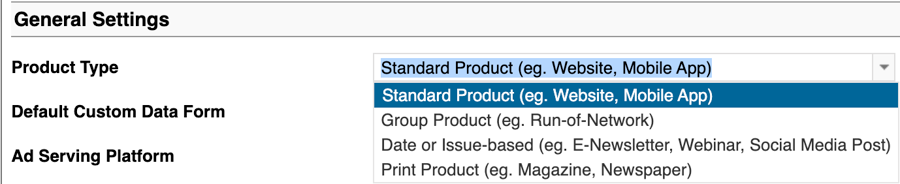
If set to true, only items with an issue date will be returned. (This would filter out any product types which are "Standard Product or Group Product" in product setup:
SpecificIssueDate
Instead of sending in a Start Date and End Date above which is the same date, plus indicating that only date based products are desired, just this single parameter could be sent in with a specific issue date and the same result would be returned with fewer parameters required.
UseControllerFromProduct
This one is not a filter parameter, but rather controlling which Production Controller is passed in the data returned. Production Controller can be assigned at the Product Group and/or the Product. If this is true, it will look at the Product for the Controller, if this is false it will look at the Product Group.
RepIDs
This is a filter looking at the Order Rep on the line
OnlyReturnNavigaPlanOrders
This will filter for only orders which would go to Naviga Plan. Setting this to true would typically filter out any eNewsletter products that would otherwise get picked up in something issue date based. It would also exclude Inserts or other Ad Type that is configured to not go to Plan.
ArtistID
If the Order line has a material attached, and that material has an artist assigned, then this will act as a filter to only include orders for that artist. Artists are set up in Naviga In Setup -> Artwork Workflow Setup -> Artists Setup. The artist ID is their email address from setup.
ReturnLinerAds
This is a true/false field. Enter True to also include Liners. If omitted, liner ads will NOT be included.
UpdatedSinceDateTime
This is looking at the History of Changes screen on a campaign. It can be used in conjunction with the two "SkipChanges" parameters below, or it can be used on it's own. Formatting for this field will look like this:
The above means that I would want to return anything that has changed since 1:25 pm on Jan 20, 2026. If the below "SkipChanges" parameters are included the items might be further filtered to exclude certain types of changes, for example, if the campaign was updated with billing or tearsheet information, it is unlikely to be desirable to re-output to a production system, but if it is Issue Data (which includes size changes & additional issues added) - that would be very important to send to a production system.
DeletedFlag
This is looking for line items which have been deleted. Options for this string field are: ALL - Includes both deleted lines and active lines DELETED - Includes only deleted lines ACTIVE - Includes only lines which have not been deleted If nothing is sent in this parameter, ACTIVE will be returned.
RunByMaterialDueDate
This is a true false field. If set to true, the start and end date range on the query above will be looking at the material due date and not the run dates. The material due date in the results is this field:
ProductsInGroup
This is an array of Product Groups. It can be used in place of the single product group. In both of these product group filters, the query results are returning line items of products which belong to the product group. The campaign does not have to be booked for the group.
FieldsToSkipChanges
This is looking at the History of Changes screen on a campaign, and specifically the Field(s) Changed Column. The parameters to fill in here would be an exact match to what is in that column (case sensitive). And it works in conjunction with the UpdatedSinceDateTime parameter above. Please see below for an example.
StatusesToSkipChanges
This is looking at the History of Changes screen on a campaign, and specifically the New Value Column. The statuses expected here are the Campaign Status ID's, so Q1, Q2, IS, etc. And it works in conjunction with the UpdatedSinceDateTime parameter above. Please see below for an example.
This screenshot shows several examples of the fields which get changed on a campaign:
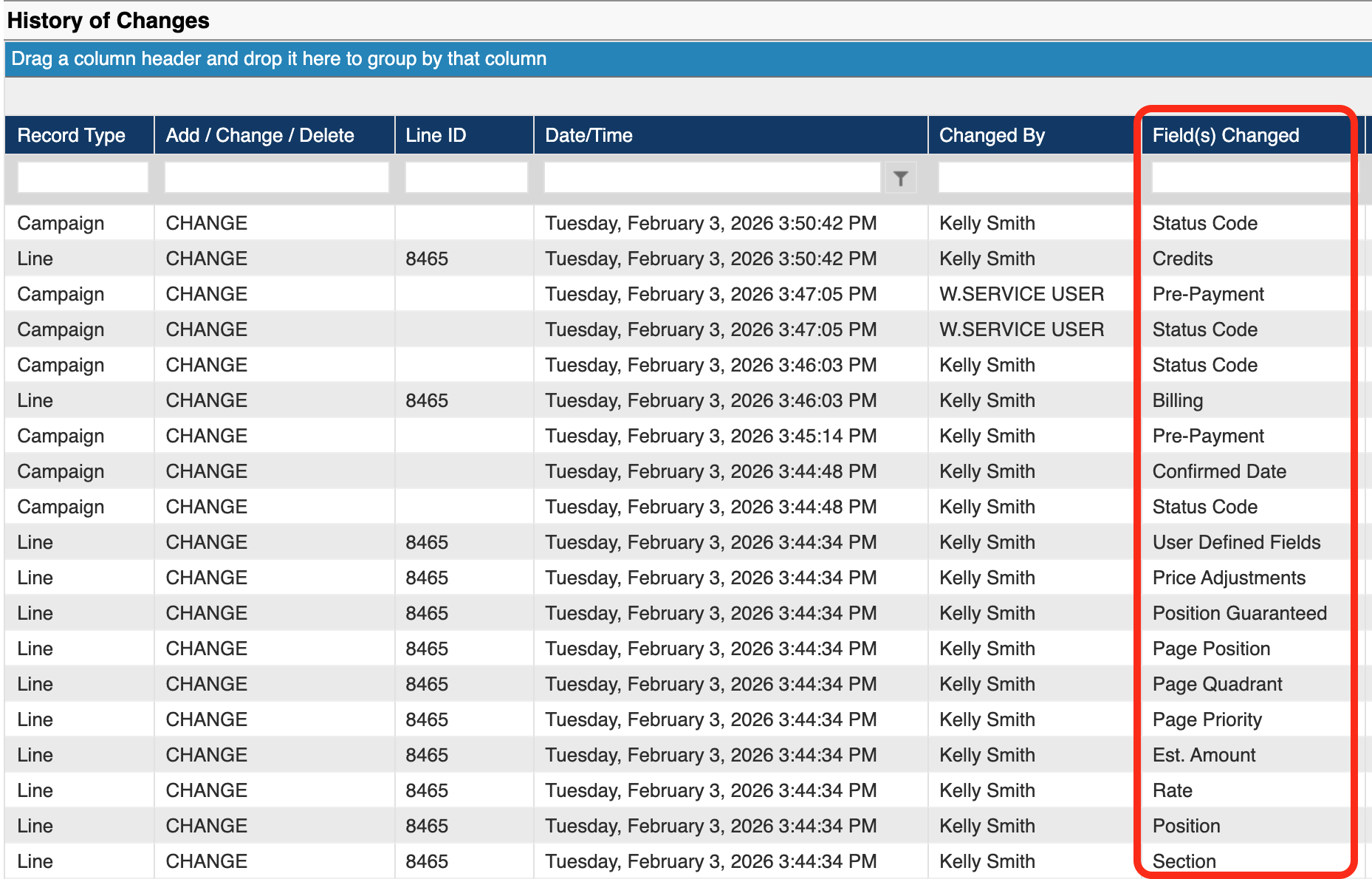
These are the fields which would be added to the array FieldsToSkipChanges if you want to ignore those changes.
These are ALL available Line Level field changes
Actual R.O.N. Sites
Expected Creative - Mater Size
Month Data
Ad Type Id
Expected Creative - Native Media Orientation
Order Reps.
Ad Unit
Expected Creative - Native Media Orientation
Original Reps.
Billing
Expected Creative - Sizes
Page Number
Cancel Status
Expected Creative - Targeting Rule IDs
Page Position
Classified Category
Expected Creative - Targeting Rule IDs
Page Priority
Classified Tree Id
GAM End Time
Page Quadrant
CO-OP Details
GAM Excluded Ad Units
Position
Color Code
GAM Included Ad Units
Position Guaranteed
Contract Id
GAM Start Time
Price Adjustments
Creative Type
Google Line ID
Product Id
Credits
Internal Comment
Production Form
Dimensions
Issue Data
Rate
End Date
Issue Material
Reallocation Line
Est. Amount
Issue Material Status
Requested Page Number
Est. Qty
Line Desc.
Section
Est. R.O.N. Sites
Master Size
Space Holder Id
Expected Creative - Ad Unit Frequency Cap
Material Status
Split Order
Expected Creative - AMP Only Y/N
Materials / Creatives
Start Date
Expected Creative - Count
Meta Data
User Defined fields
These are ALL available Campaign Level field changes
Advertiser Id
Internal Notes
Pre-Payment
Agency
Invoice Comments
Production Contacts
Agency Pct%
Journal Entries
Production Controller
Billing Schedule
Linked Jobs
Revenue Budgets
Brand Id
Marketing Campaign
Run until Cancel Ind.
CO-OP Details
Order Contact
Self Service Approval Ind.
Confirmation Comments
Order Reps.
Self Service Email
Confirmed Date
Original Reps.
Self Service Phone
Contract Id
Override Address
Space Holder Indicator
Discount Pct%
Override Advertiser Address
Start Date
End Date
Override Billing Contact
Status Code
Exhibition Orders
Override Territory
Tearsheet Contacts
Expense Budgets
P.O. Number
Terms Code
Industry Code
For the array StatusesToSkipChanges, here is an example of a simple campaign history to illustrate:
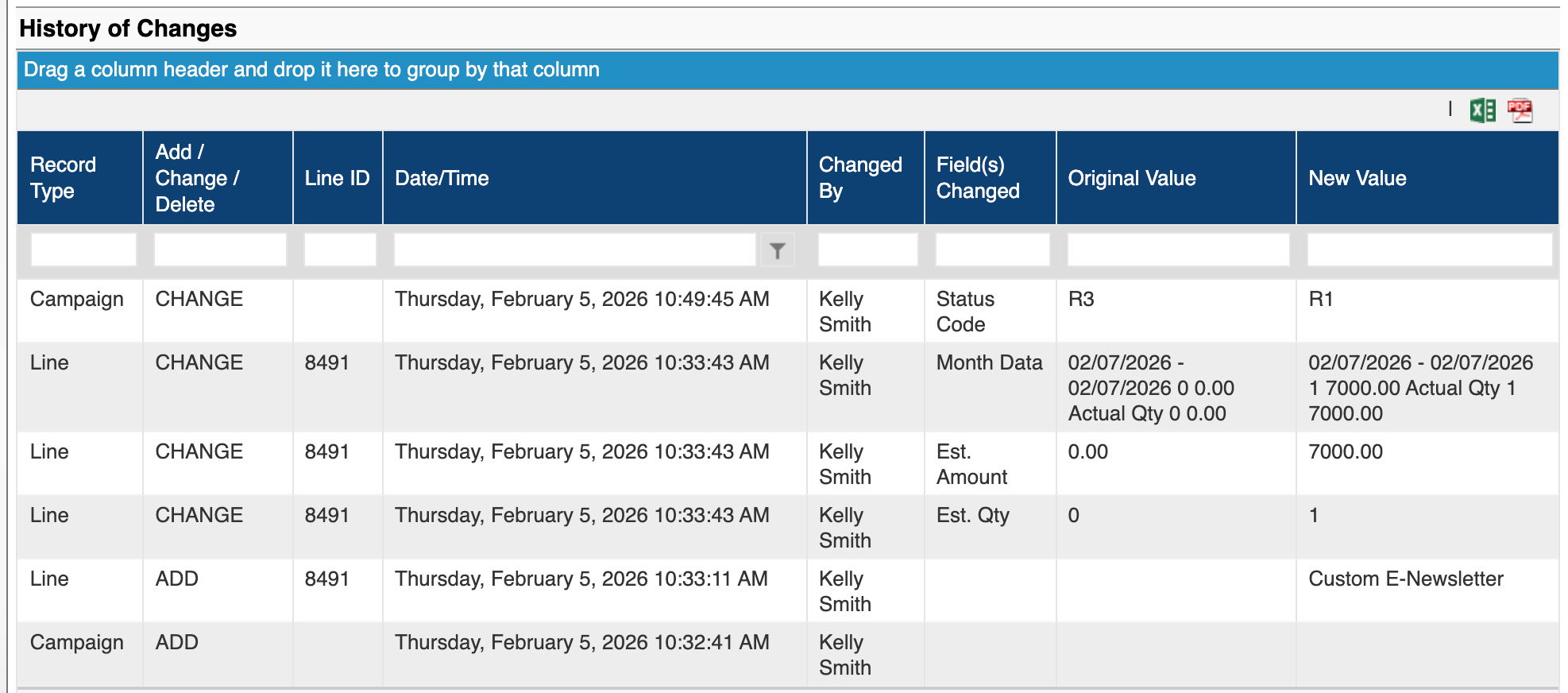
Note that the campaign line was created at 10:33 and at 10:49, the status was changed to R1.
Passing this payload in, which is saying to return results which have been timestamped since 10:30, not including R1 changes:
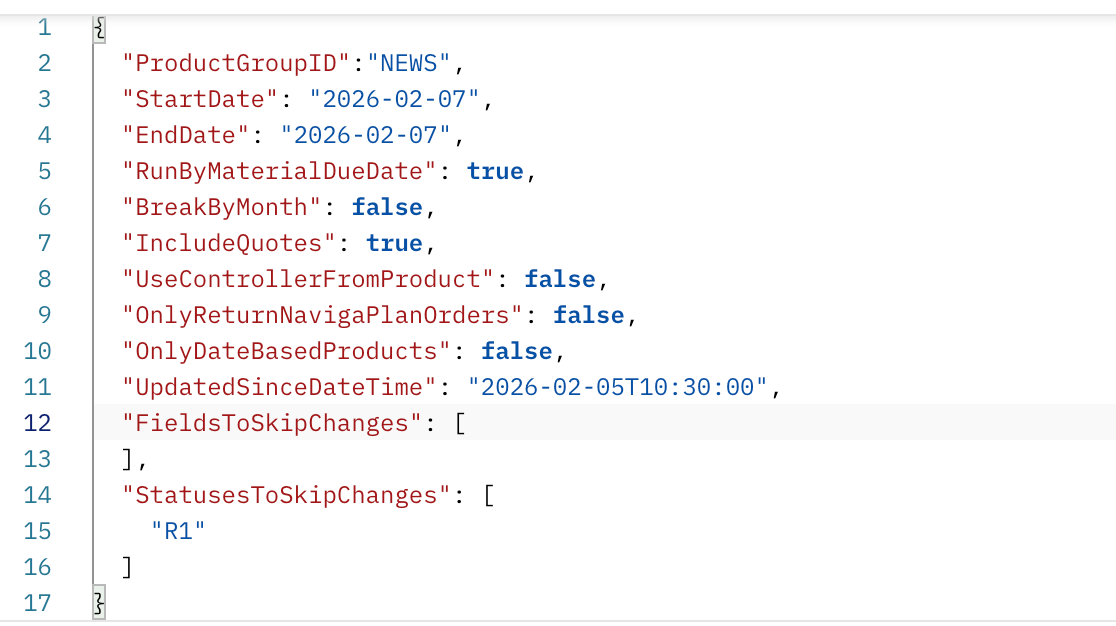
That will still return my order line because changes HAVE happened to this order line since 10:30, which were not a change to R1. So it isn't looking at the fact that my campaign is currently in R1 status - it is looking for the change to R1 being in the time specified
If I changed the time to 10:40, then this campaign will not be returned because the only thing that has happened since 10:40 is the change to R1 status, and I have said to ignore that change.
Was this helpful?