> For the complete documentation index, see [llms.txt](https://docs.navigaglobal.com/newsroom-planner/llms.txt). Markdown versions of documentation pages are available by appending `.md` to page URLs; this page is available as [Markdown](https://docs.navigaglobal.com/newsroom-planner/admin-guide/integrate-with-nrp.md).
# Integrate with Newsroom Planner
Newsroom Planner uses other plugins functionality to complete some of its tasks.
For example NRP relying on [Naviga Photos](https://docs.infomaker.io/naviga-photo/) to handle searching for images and handle images metadata.
Newsroom Planner uses Dashboard portals to render other plugins components in its own context.
Thanks to Dashboard mappings you can replace [Naviga Photos](https://docs.infomaker.io/naviga-photo/) with your own image service portal and integrate your plugin into Newsroom Planner
### What kind of portals does Newsroom Planner use?
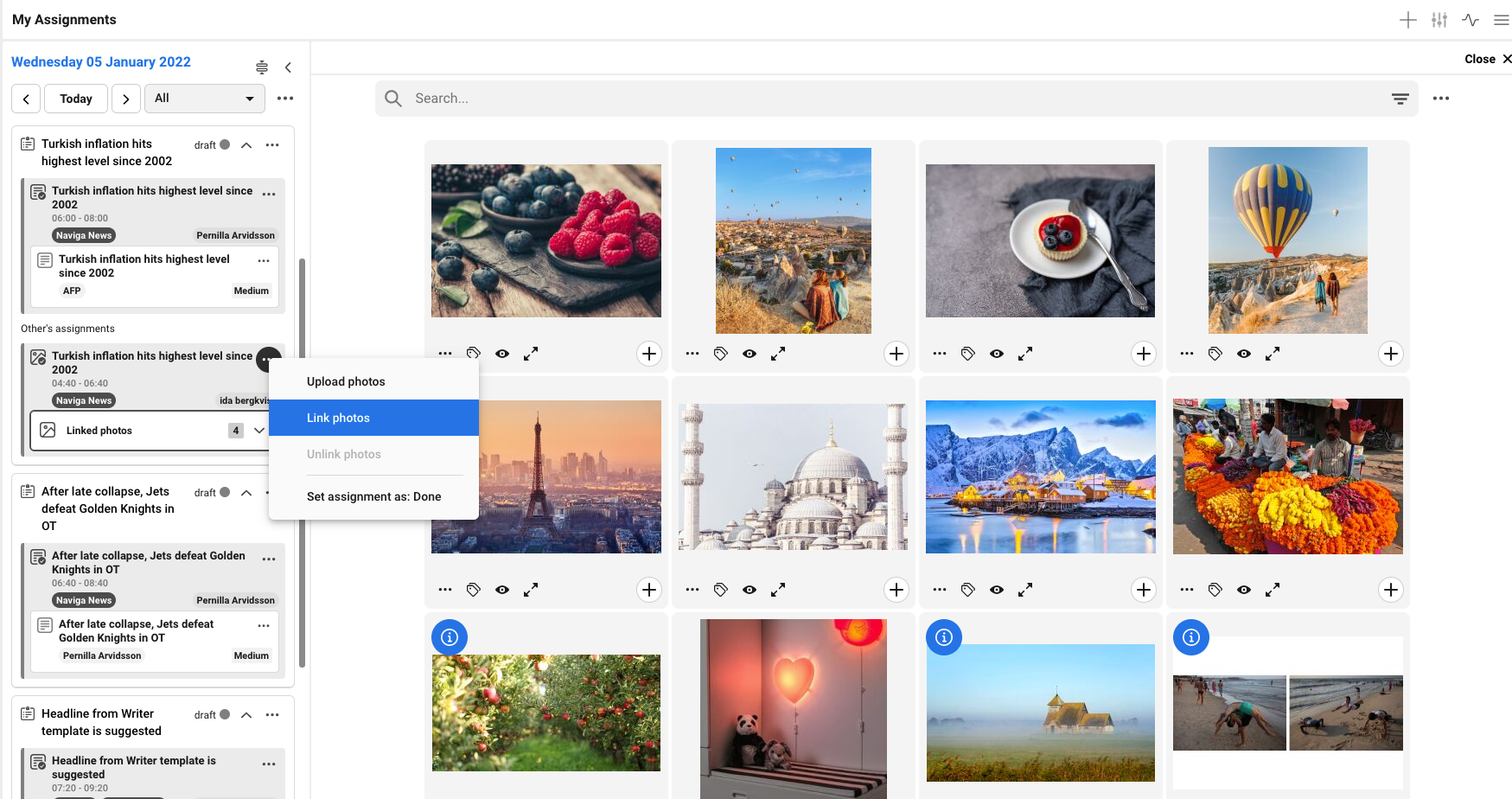
Newsroom Planner uses 4 different portals in order to search for images and link them or display images as a gallery or upload images.
| Portal | Description |
| ------------- | ------------------------------------------------- |
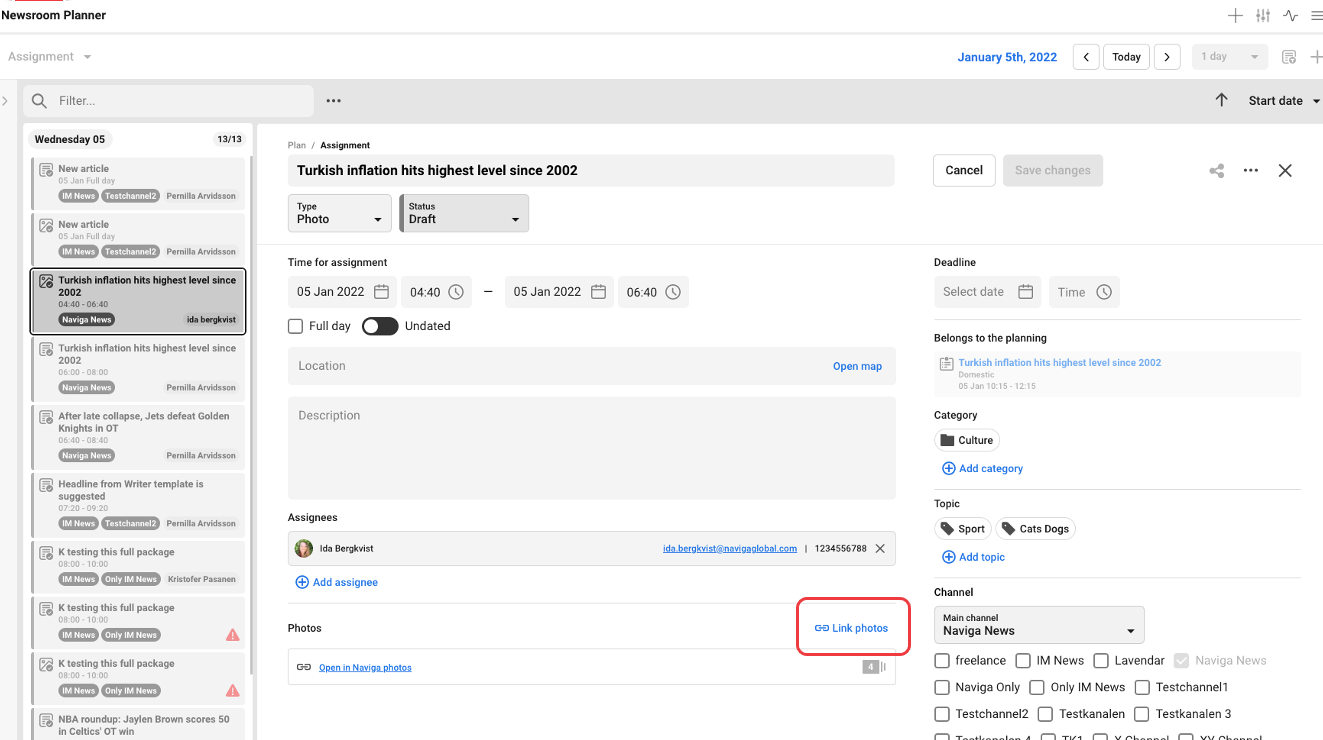
| ImageSearch | Search for images and link them to an Assignment. |
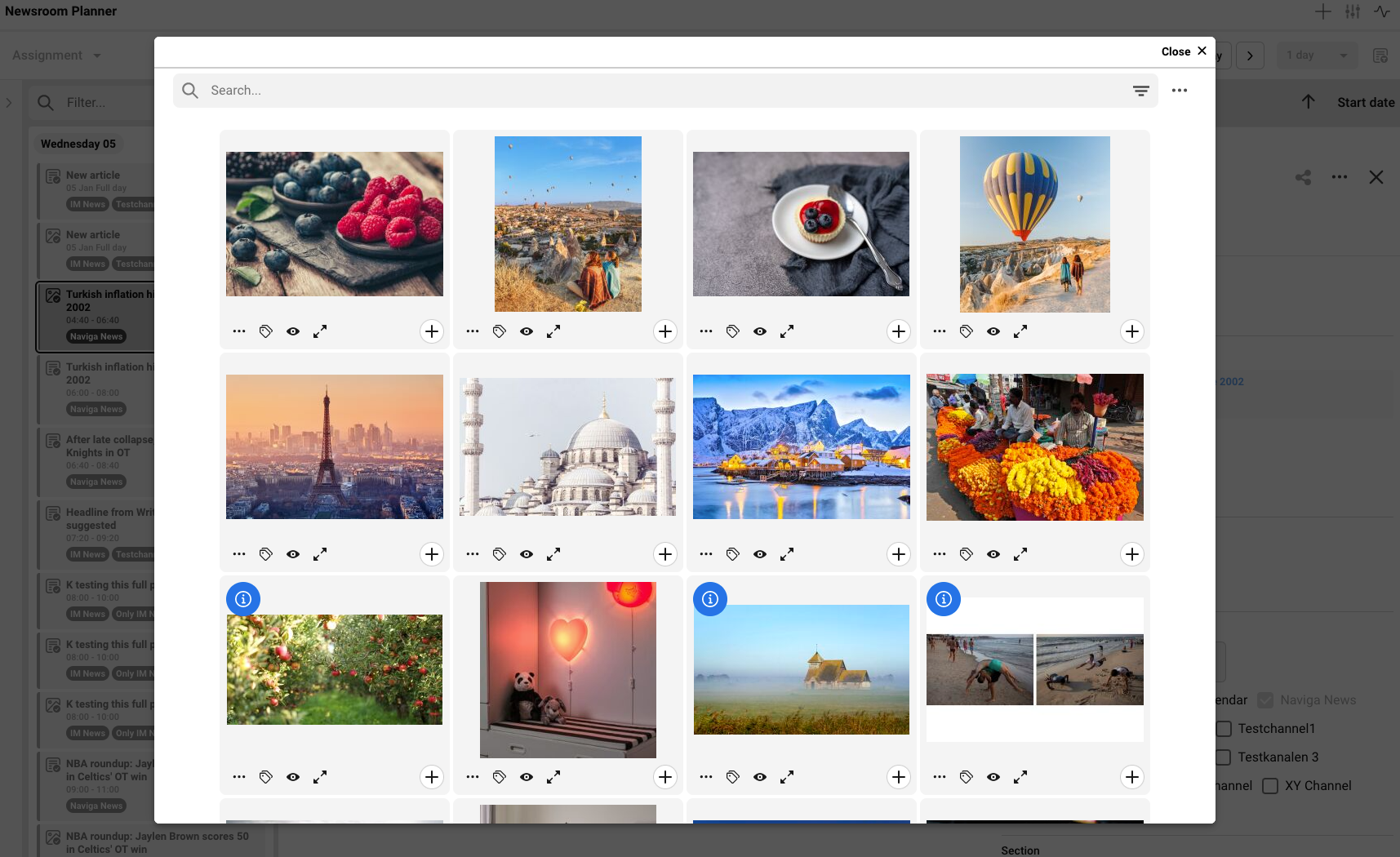
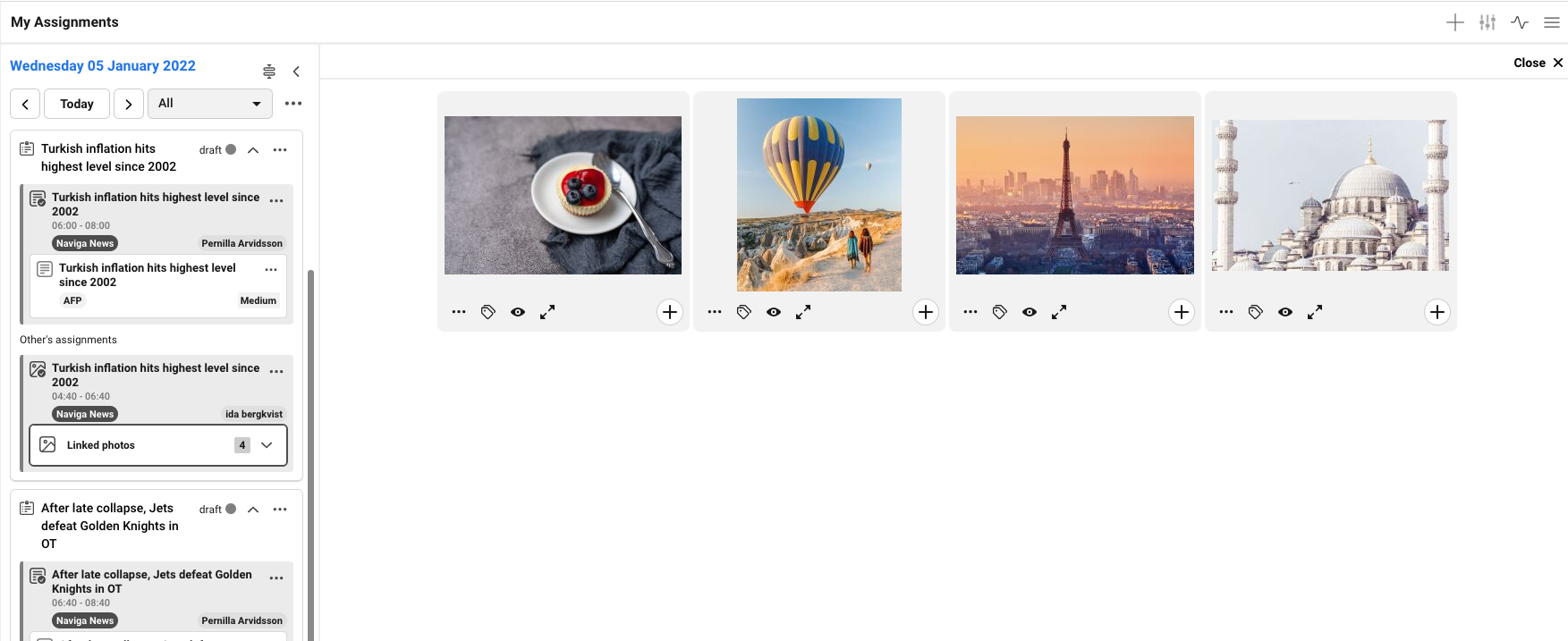
| ImageGallery | Display Assignment's images. |
| ImageMetadata | Change Assignment's images metadata. |
| ImageUpload | Upload Images, and link them to an Assignment. |
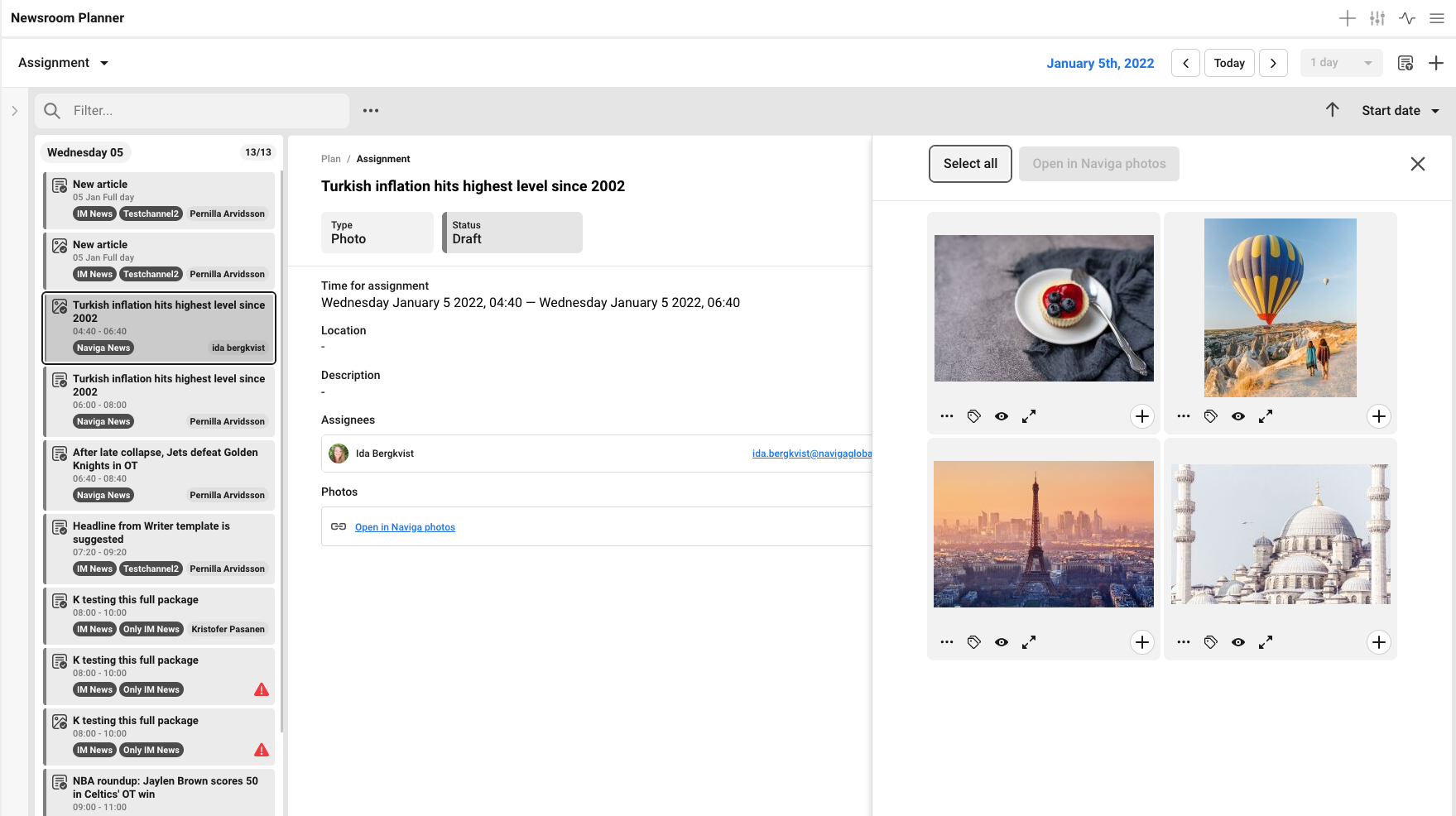
### ImageSearch portal
This portal used to search for images and link the selected images to the active assignment.
#### Where is it rendered?
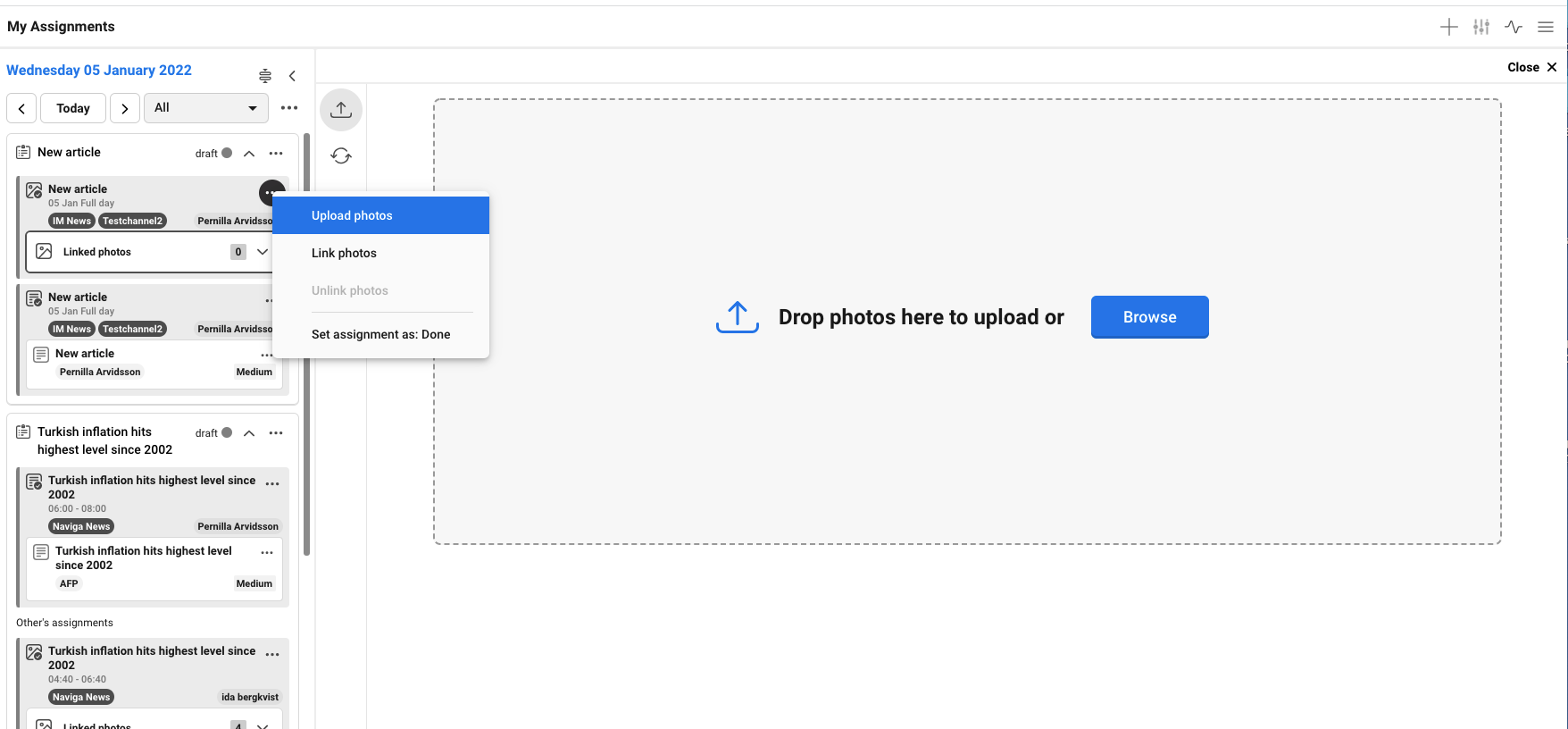
In My assignment view:
In assignment detail view:
#### **Props:**
| Name | Type | Description |
| ------------- | -------- | ----------------------------------------------------------------------------------- |
| onLink | Function | A callback function expected to be called with array of image's **uuid, filename**. |
| localizations | Object | A localizations object contains localized strings. |
| editMode | Boolean | A flag to tell the portal that NRP in an edit mode or not. |
{% hint style="info" %}
Newsroom Planner doesn't call any methods from ImageSearch portal
{% endhint %}
Example**:**
```jsx
const MySearchPortal = props => {
const [selectedImages, setSelectedImages] = useState([])
const {
onLink
} = props
const handleOnSelect = selectedImage => {
const images = selectedImages.push(selectedImage)
setSelectedImages(images)
}
const handleLinkImages = () => {
/*
selectedImages format:
[
{
filename: 'myImage.jpg'
uuid: '123-123-321321-123-123'
},
{
filename: 'logo.jpg'
uuid: '444-423-774238-321-006'
}
]
*/
onLink(selectedImages)
}
return (
)
}
```
#### Localizations
Supports English & Swedish
```jsx
console.log(this.props.localizations)
/*
{
link: 'Link selected photos'
}
*/
```
#### How Newsroom Planner render ImageSearch
```jsx
const ImageSearchWrapper = props => {
const {
editMode,
localize,
linkImagesToAssignment
} = props
const handleOnLink = selectedImages => {
linkImagesToAssignment(selectedImages)
}
return (
)
}
```
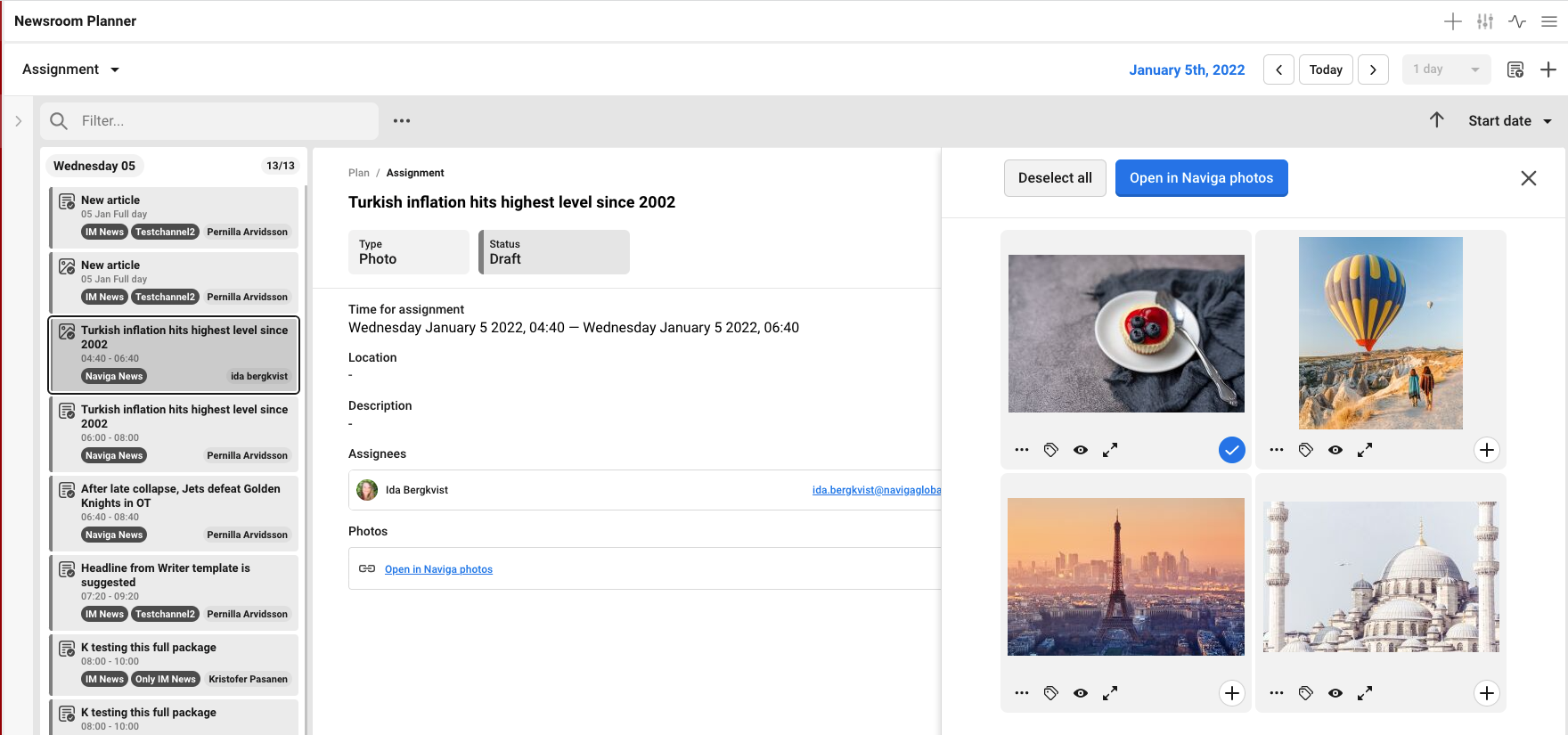
### ImageGallery portal
This portal used to display the active assignment's images.
#### Where is it rendered?
In My assignment view:
In assignment detail view:
#### Props**:**
| Name | Type | Description |
| ------------- | -------- | --------------------------------------------------------------------------------------------------------------------------------------------------------- |
| onSave | Function | A callback function expected to be called if the portal made any changes to the mages. |
| onCancel | Function | A callback function expected to be called if the portal made any changes to the images. |
| confirm | Function | A confirm helper method utilise [Application Confirm](https://docs.infomaker.io/dashboard-plugin/application#confirm). |
| closeConfirm | Function | A callback helper function to close the confirm dialog if it's triggered. |
| onSelection | Function | A callback function expected to be called with all the images and a boolean for the selected images. Used in **My Assignment** view ***more info below*** |
| images | Array | An array of the Assignment images. |
| editMode | Boolean | A boolean to tell the portal that NRP in an edit mode or not. |
| managePhotos | Boolean | A boolean to tell the portal if it can handle images metadata or not. |
| fullWidth | Boolean | A boolean to tell the portal if it's rendered within **My Assignment** view or **Assignment Detail** view ***more info below*** |
| localizations | Object | A localizations object contains localized strings. |
{% hint style="danger" %}
NRP require some methods to be accessible from NRP components ***more info below***
{% endhint %}
Example**:**
```jsx
const MyGalleryPortal = (props, ref) => {
const [images, setImages] = useState(props.images)
const {
onSave,
onCancel,
onSelection
} = props
useEffect(() => {
/*
Methods will be called by NRP.
*/
if (ref && ref.current) {
ref.current = {
selectAll: () => {},
deselectAll: () => {},
updateImages: () => {}
}
}
})
const handleOnSelect = selectedImage => {
const mappedItems = images.map(item => {
if (item.uuid === selectedImage.uuid) {
return {
...item,
selected: true
}
} else {
return item
}
})
setImages(mappedItems)
// Update NRP with updated images
onSelection(mappedItems)
}
return (
)
}
export default forwardRef(MyGalleryPortal)
```
#### Localizations
Supports English & Swedish
```jsx
console.log(this.props.localizations)
/*
{
link: 'Link selected photos'
}
*/
```
#### Functions should be accessible from NRP provided by ImageGallery portal
* updateImages
* A function will give the updated images from the Assignment.
* selectAll
* A function to handle selecting all images.
* deselectAll
* A function to handle deselect all images.
#### How NRP render ImageGallery
{% tabs %}
{% tab title="My Assignment view" %}
```jsx
const MyAssignmentPortalWrapper = props => {
const {
assignment,
confirm,
closeConfirm,
closeGallery,
resetImageGalleryPortal
} = props
const imageGalleryRef = useRef()
/*
This hook will track the active Assignemnt
if the user clicked on another assignment to show the images
this hook will call "updateImages" function from ImageGallery
portal and pass the new active Assignment's images
*/
useEffect(() => {
if (imageGalleryRef.current && typeof imageGalleryRef.current.updateImages === 'function') {
const updatedImages = assignment.images.map(item => {
return {
uuid: item.uuid,
filename: item.filename
}
})
imageGalleryRef.current.updateImages(updatedImages)
}
}, [assignment.uuid])
const handleReset = () => {
resetImageGalleryPortal()
}
const handleOnClose = () => {
if (imageGalleryRef.current) {
if (typeof imageGalleryRef.current.cancel === 'function') {
imageGalleryRef.current.cancel()
}
}
closeGallery()
}
const images = assignment.images.map(item => {
return {
uuid: item.uuid,
filename: item.filename
}
})
return (
)
}
```
{% endtab %}
{% tab title="Assignment Detail view" %}
```jsx
const AssignmentDetailPortalWrapper = props => {
const {
assignment,
confirm,
closeConfirm,
openMetadataModal
} = props
const [selectedImages, setSelectedImages] = useState([])
const imageGalleryRef = useRef()
const handleOnSelectction = images => {
setSelectedImages(images.filter(image => image.selected))
}
const handleUnlinkFromAssignment = () => {
if (selectedImages.length) {
selectedImages.forEach(item => {
unlinkImage(item.uuid)
})
if (imageGalleryRef.current) {
if (typeof imageGalleryRef.current.updateImages === 'function') {
const updatedImages = assignment.images.map(i => {
return {
uuid: i.uuid,
filename: i.filename
}
})
imageGalleryRef.current.updateImages(updatedImages)
}
}
setSelectedImages([])
}
}
const handleSelect = () => {
if (imageGalleryRef.current) {
if (!selectedImages.length) {
if (typeof imageGalleryRef.current.selectAll === 'function') {
imageGalleryRef.current.selectAll()
}
} else {
if (typeof imageGalleryRef.current.desselectAll === 'function') {
imageGalleryRef.current.desselectAll()
}
}
}
}
const handleImagesMetadata = () => {
/*
This function will open ImageMetadata portal inside a Modal
with all selected images
*/
openMetadataModal({
images: selectedImages
})
}
const images = assignment.images.map(item => {
return {
uuid: item.uuid,
filename: item.filename
}
})
return (
)
}
```
{% endtab %}
{% endtabs %}
### ImageUpload portal
This portal used to upload images, and provide the uploaded images to be linked to the active assignment.
#### Where is it rendered?
In My assignment view:
#### **Props**
| Name | Type | Description |
| ------------ | -------- | ---------------------------------------------------------------------------------------------------------------------- |
| onDone | Function | A callback function expected to be called with images array when the images has been uploaded. |
| onUpload | Function | A callback function expected to be called when the portal starts uploading images. |
| onCancel | Function | A callback function expected to be called when the user cancel uploading images. |
| confirm | Function | A confirm helper method utilise [Application Confirm](https://docs.infomaker.io/dashboard-plugin/application#confirm). |
| closeConfirm | Function | A callback helper function to close the confirm dialog if it's triggered. |
{% hint style="danger" %}
NRP require some methods to be accessible from NRP components ***more info below***
{% endhint %}
**Example**
```jsx
const MyUploadPortal = (props, ref) => {
const [selectedFile, setSelectedFile] = useState(null)
const {
onDone,
onUpload,
onCancel
} = props
useEffect(() => {
/*
Methods will be called by NRP.
*/
if (ref && ref.current) {
ref.current = {
cancel: cancelProccess
}
}
})
const handlePhotos = file => {
setSelectedFile(file)
}
const handleUpload = () => {
if (selectedFile) {
onUpload()
fetch('api/upload', {selectedFile})
.then((response) => {
const uploadedImages = response.images.map(item => {
return {
uuid: item.uuid,
filename: item.filename
}
})
onDone(uploadedImages)
})
}
}
const handleCancel = () => {
cancelProccess()
onCancel()
}
const cancelProcesses = () => {
// cacnel on going processes...
}
return (
)
}
export default forwardRef(MyUploadPortal)
```
#### Functions should be accessible from NRP provided by ImageUpload portal
* cancel
* A function will be called when the ImageUpload portal is unmounted to clean up onGoing processes for example.
#### How NRP render ImageUpload
```jsx
const MyAssignmentPortalWrapper = props => {
const {
assignment,
confirm,
closeConfirm,
closeUploadPortal
} = props
const imageUploadRef = useRef()
const handleOnClose = () => {
if (imageUploadRef.current) {
if (typeof imageUploadRef.current.cancel === 'function') {
imageUploadRef.current.cancel()
}
}
closeUploadPortal()
}
const handleUploadedImages = uploadedImages => {
assignment.linkImages(uploadedImages)
}
const handleOnUploadStart = () => {
assignment.setUploadingFlag()
}
return (
)
}
```
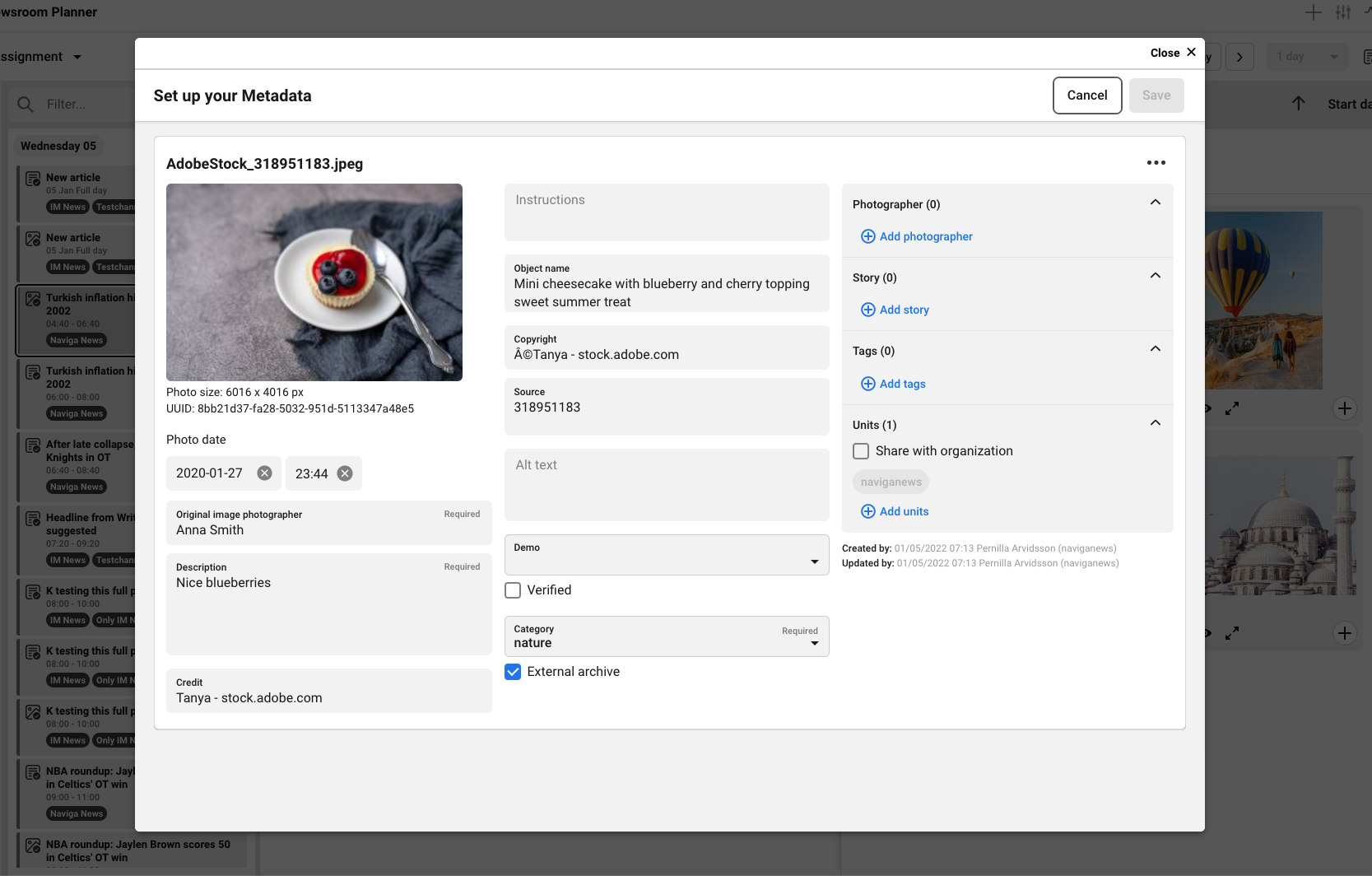
### ImageMetadata portal
This portal used to change images metadata
#### Where is it rendered?
In Assignment detail view:
#### **Props**
| Name | Type | Description |
| ------------ | -------- | ---------------------------------------------------------------------------------------------------------------------- |
| images | Array | An array of the selected images to change metadata on them. |
| onSave | Function | A callback function expected to be called when the user done with updating metadata for the images. |
| onCancel | Function | A callback function expected to be called when the user cancel updating images metadata. |
| confirm | Function | A confirm helper method utilise [Application Confirm](https://docs.infomaker.io/dashboard-plugin/application#confirm). |
| closeConfirm | Function | A callback helper function to close the confirm dialog if it's triggered. |
{% hint style="danger" %}
NRP require some methods to be accessible from NRP components ***more info below***
{% endhint %}
**Example**
```jsx
const MyMetadataPortal = (props, ref) => {
const {
images,
onSave,
onCancel
} = props
useEffect(() => {
/*
Methods will be called by NRP.
*/
if (ref && ref.current) {
ref.current = {
cancel: cancelProccess
}
}
})
const handleSave = () => {
// Update images metadata
onSave()
}
const handleCancel = () => {
cancelProccess()
onCancel()
}
const cancelProcesses = () => {
// cacnel on going processes...
}
const selectedImages = images.map(image => {
return (
...
![]()
)
})
return (
{ selectedImages }
)
}
export default forwardRef(MyUploadPortal)
```
#### Functions should be accessible from NRP provided by ImageMetadata portal
* cancel
* A function will be called when the ImageMetadata portal is unmounted to clean up onGoing processes for example.
#### How NRP render ImageMetadata
```jsx
const MyAssignmentPortalWrapper = props => {
const {
selectedImages,
confirm,
closeConfirm,
closeMetadataPortal
} = props
const imageMetadataRef = useRef()
const handleOnClose = () => {
if (imageMetadataRef.current) {
if (typeof imageMetadataRef.current.cancel === 'function') {
imageMetadataRef.current.cancel()
}
}
closeMetadataPortal()
}
const handleOnSave = () => {
closeMetadataPortal()
}
const handleOnCancel = () => {
closeMetadataPortal()
}
return (
)
}
```
---
# Agent Instructions
This documentation is published with GitBook. GitBook is the documentation platform designed so that both humans and AI agents can read, navigate, and reason over technical content effectively. Learn more at gitbook.com.
## Querying This Documentation
If you need additional information that is not directly available in this page, you can query the documentation by asking a question.
Perform an HTTP GET request on the following URL with the `ask` and `goal` query parameters:
```
GET https://docs.navigaglobal.com/newsroom-planner/admin-guide/integrate-with-nrp.md?ask=&goal=
```
`ask` is the immediate question: it should be specific, self-contained, and written in natural language.
`goal` is what the user is ultimately trying to achieve, the reason they need the answer. Sharing it helps GitBook give you a better, more relevant answer. A goal is most helpful when it describes the outcome the user wants rather than restating the question. For example, with `ask=how do I create an API token`, a goal like `automate deployments from our CI pipeline` lets GitBook tailor the answer to that use case.
The response will contain a direct answer to the question and relevant excerpts and sources from the documentation.
Use this mechanism when the answer is not explicitly present in the current page, you need clarification or additional context, or you want to retrieve related documentation sections.